

In November, monday.com is once again delivering a whole host of exciting new features: from smart improvements to the form builder and new automation options to granular admin rights and UI optimisations. What's particularly striking is that many of the updates are aimed at giving existing power users even more control and flexibility, while at the same time making it easier for new users to get started.
In this article, you'll find the most exciting new features at a glance.
monday AI
New counting method for AI credits
Update status: fully rolled out
From 17 November 2025, the way AI credits are counted will change: one AI credit will now cost £0.01, but will also consume more (e.g. 8 credits instead of 1). This change does not alter the actual costs or the range of functions, but ensures a more transparent and standardised pricing structure.
The new logic makes it easier to understand AI usage and lays the foundation for differentiated pricing of future AI features.
monday vibe: Undo changes
Update status: fully rolled out
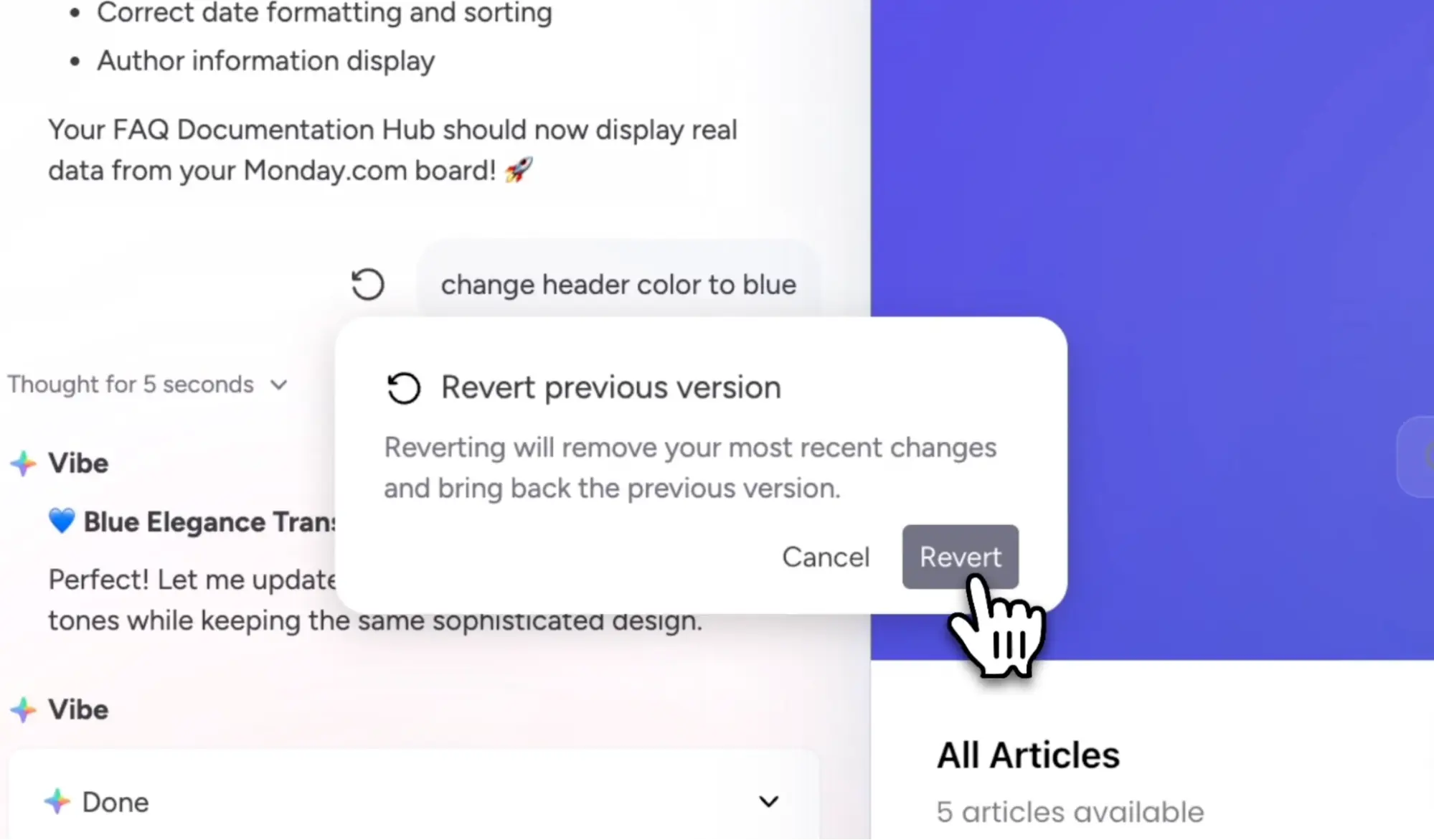
User in monday Vibe can now undo changes to their apps and revert to previous versions. This allows for free experimentation and reduces the risk of unwanted errors during development.
Use Cases
- A partner tests new logic in a custom app but can revert to the previous version at any time.
- An internal developer improves an app iteratively without having to worry about losing working parts.
monday Work OS
Managed Templates: new limits & add-On
Update status: fully rolled out (from 17 November 2025)
Managed Templates are officially leaving the beta phase. In future, use will be limited to 20 templates per account (across all products). For enterprise customers, there is a paid add-on that unlocks additional templates in the form of "buckets". Accounts that currently use more than 20 templates will retain access, initially at no additional cost.
This innovation is primarily aimed at large organisations that want to implement standardised processes across multiple teams.
Use Cases
- A PMO department maintains central project templates and rolls them out in a standardised manner.
- An HR team uses a central onboarding template that is automatically transferred to new employee boards.
Role management at board level
Update status: being rolled out gradually – for Enterprise subscriptions
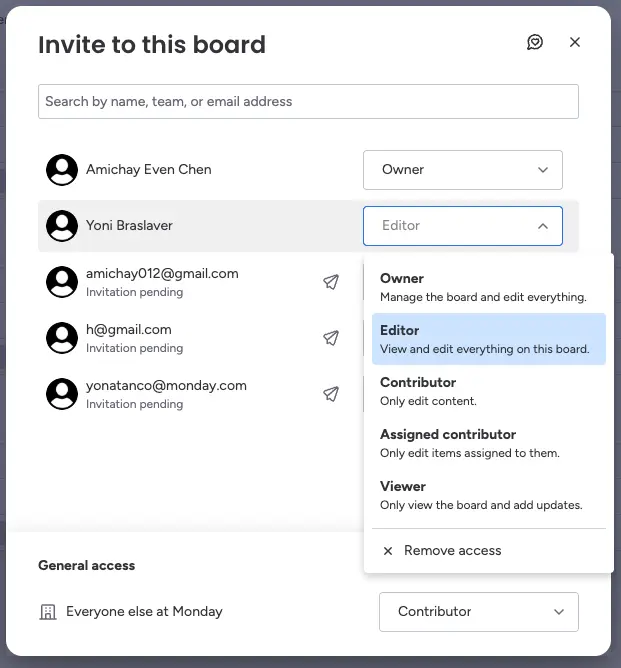
With the new "Board Roles" feature, board owners can now assign differentiated access rights to individual users or entire teams – e.g. as editor, contributor, assigned contributor or viewer. This not only makes collaboration more efficient, but also increases data security, as only authorised persons can make changes. This creates more clarity and control, especially for large teams or complex projects.
Use Cases
- In a marketing team, designers only have read access, while project managers can edit content.
- In an HR onboarding board, new employees can view content but cannot make changes.
- IT administrators can give certain groups restricted access to sensitive boards.
CoPilot Studio Connector
Update status: fully rolled out – Enterprise
monday.com can now be seamlessly integrated into Microsoft's CoPilot Studio. The new connector enables companies to integrate all monday features directly into their custom-built CoPilot agents. This deep integration accelerates the development of intelligent agents and facilitates access to data and actions from monday.com without having to leave the platform.

Limit on views per board
Update status: fully rolled out
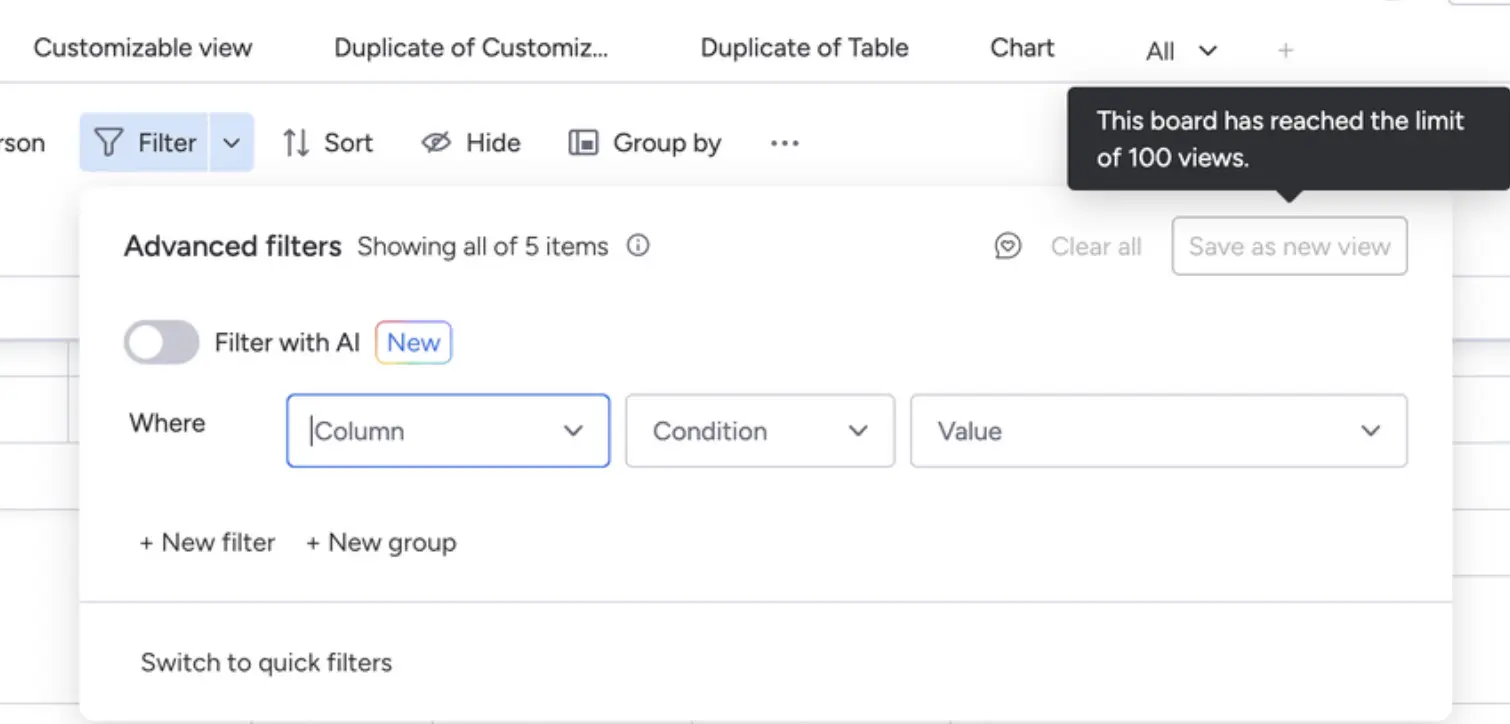
To ensure long-term performance and stability, monday.com is introducing a limit of 100 views per board. This applies to table, Gantt, calendar and custom views, for example. Large boards with many views can cause slowdowns, and this limit ensures consistently fast access for all users.
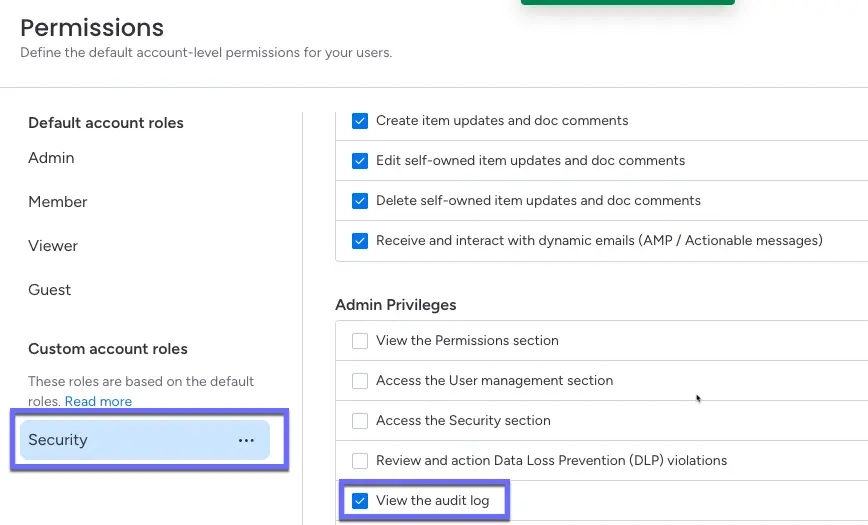
Separate authorisation for audit log access
Update status: fully rolled out
Admins can now specifically determine who has access to the audit log without having to make that person an admin. This not only reduces the admin burden, but also enhances security and compliance: security, compliance, IT or operations managers can thus specifically check account activities without being granted unnecessarily extensive rights.
Use Cases
- An IT security officer only gets access to the audit log to check for suspicious activity.
- In regulated industries such as finance or healthcare, compliance officers retain visibility without admin rights.
Adjust column widths in the list widget
Update status: fully rolled out
You can now customise the column widths in the "List view" dashboard widget. This improves readability, makes data clearer and creates a tidier interface, especially for long or numerous texts.

monday WorkForms
New text blocks for forms
Update status: fully rolled out
You can now insert text elements such as titles, notes, descriptions or conditions between questions in the form. This improves the structure and comprehensibility, especially for more complex forms or legal notices.
Use Cases
- HR teams divide application forms into sections (e.g. 'Personal details', 'Work experience').
- Marketing can enrich landing page forms with explanatory intermediate texts.

New "Add Content" menu in Form Builder
Update status: fully rolled out
Form creation is now much more efficient: instead of a drop-down menu, there is now a clearly structured "Add content" button with a modal view. This allows you to find suitable questions more quickly, select multiple items at once and build your form faster.

monday Service
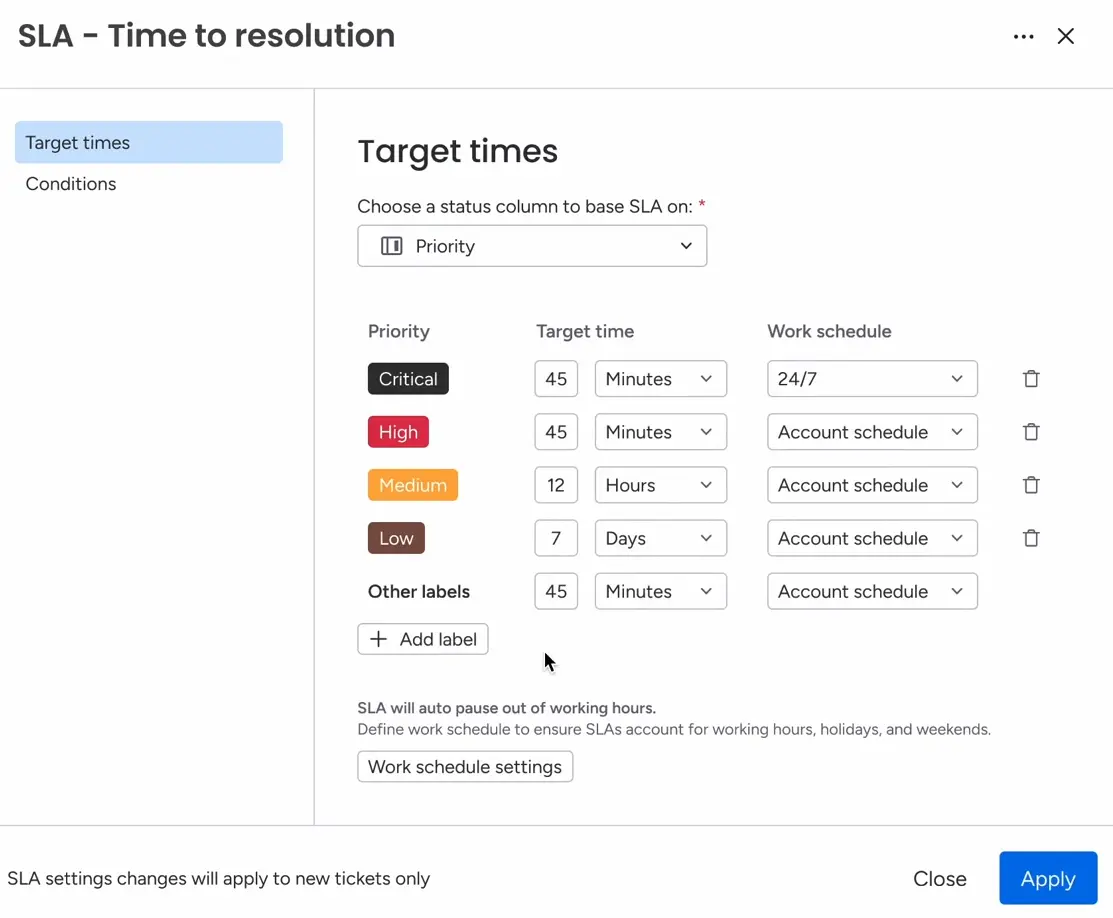
SLA Management
Update status: gradually rolled out
The new SLA management feature allows service administrators and users to configure and manage service level agreements directly in monday. The new column automatically measures the time from ticket receipt to resolution, both for human and AI-powered agents. With intelligent presets, customisation options and full platform integration, SLA tracking becomes significantly easier and more transparent.
Benefits
- Clear performance measurement of support
- Smarter prioritisation of open tickets
- Consistent service quality and higher satisfaction
Use Cases
- An IT team can use the SLA column to see whether critical tickets are being processed on time.
- Support managers can run SLA-based evaluations to better plan capacities.
monday CRM
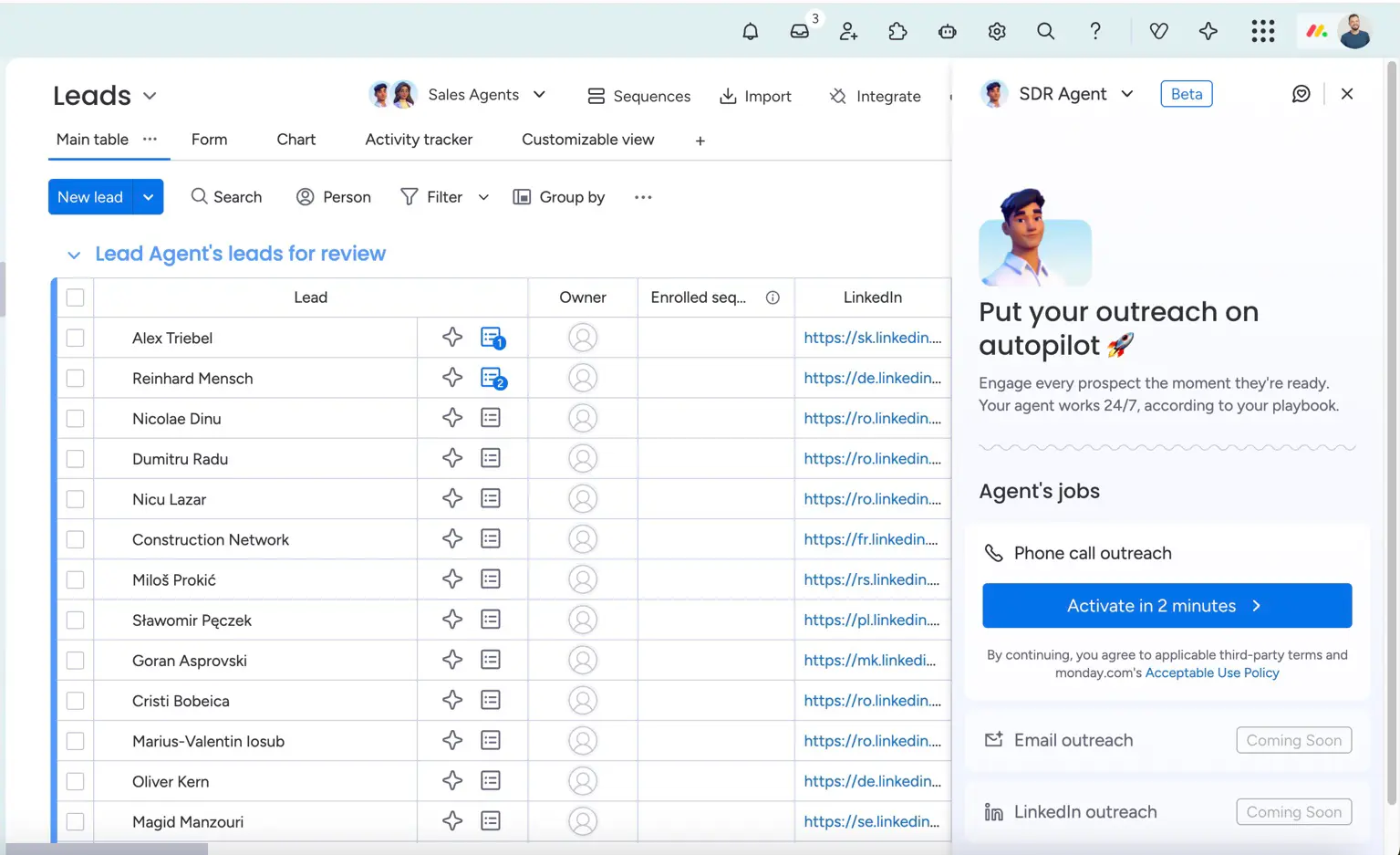
AI Sales Agent
Update status: gradually rolled out
With the new AI Sales Agent, monday CRM now even takes care of cold calling: the AI can qualify leads and automatically arrange appointments – in exactly the tone and style you want. You define the goal and the dos and don'ts, and the AI does the rest.
Benefits
- Saves time through automated initial contacts.
- Consistent conversation management and scalability.
- Faster response time to incoming leads.
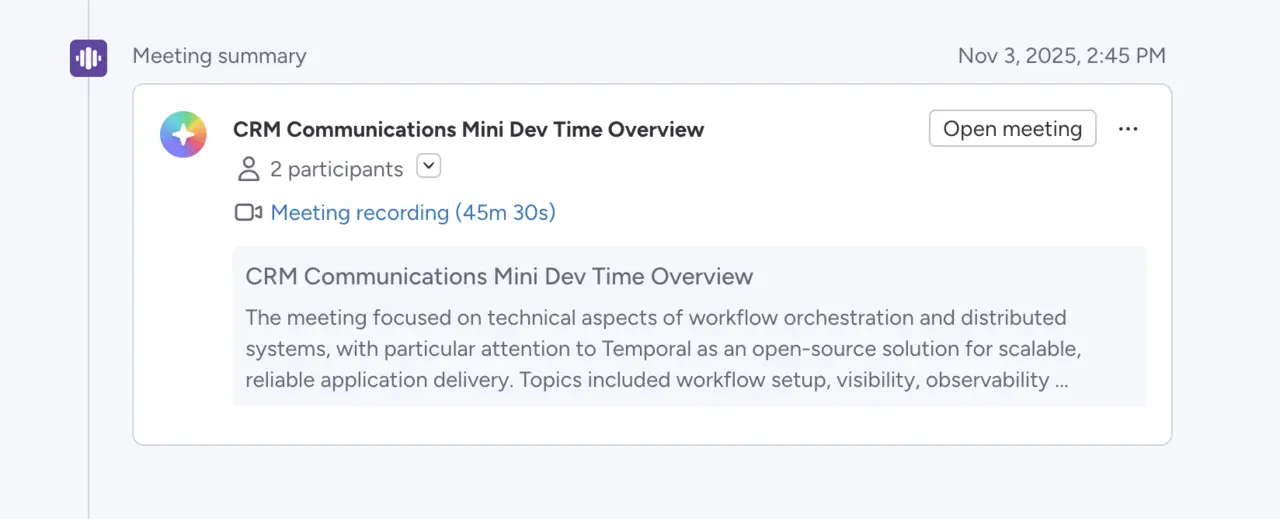
AI Notetaker in Emails & Activities
Update status: fully rolled out
From now on, meetings recorded with Notetaker will appear directly in the "Emails & Activities" timeline, including participants, a summary and a link to the recording. This makes customer contacts even more transparent and ensures that the sales history is documented in full.
Benefits
- Faster overview of the conversation history.
- Seamless integration into the existing timeline.
AI Notetaker Meeting Summary Email
Update status: fully rolled out
Want to automatically send a summary of the key points and to-dos to all participants after the meeting? That's exactly what this new feature does. It saves your team time and ensures clarity – without any follow-up work.
Benefits
- Automated communication after meetings.
- Clear to-dos for everyone involved.
- Time savings and greater commitment.
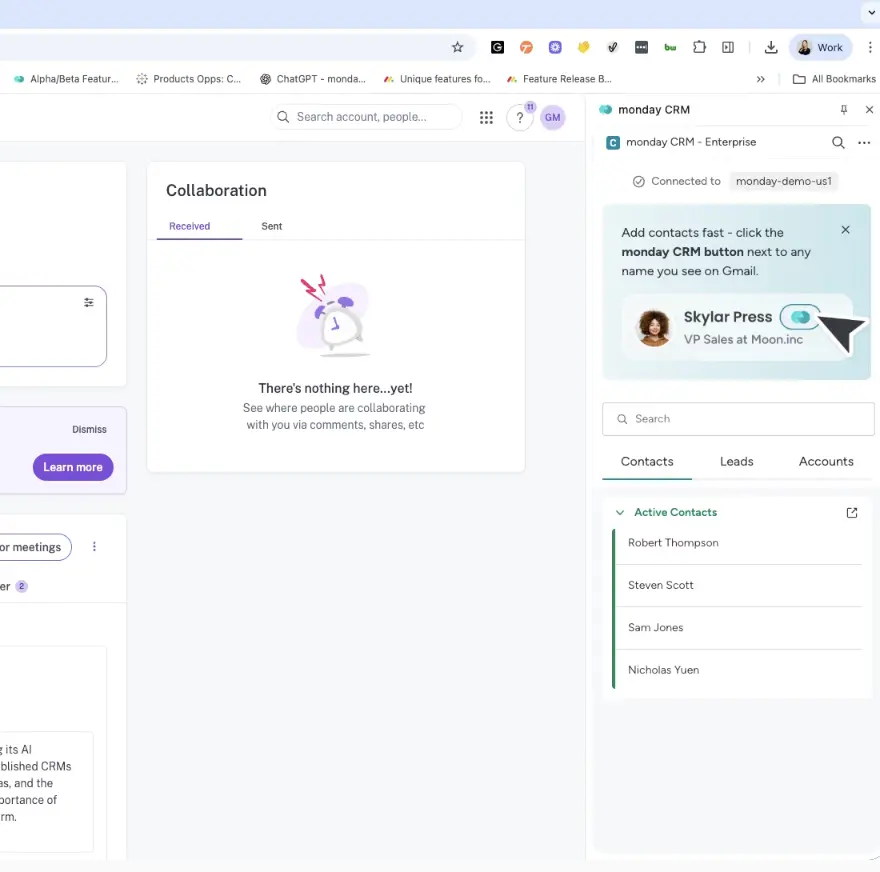
Chrome Extension V2
Update status: fully rolled out
The updated Chrome extension for monday CRM now offers significantly more functionality: you can directly search for leads and accounts, view activities, or add deals without switching tabs. This saves time and makes your CRM data accessible anywhere.
Benefits
- Quick access to CRM data in your browser.
- Add new deals and notes directly.
- User feedback directly incorporated into new features.
Use Cases
- A sales rep opens the CRM from LinkedIn to look up information about a contact.
- New leads can be entered directly into monday CRM from the browser.
- Before a call, the sales rep updates the deal status directly from their email inbox.
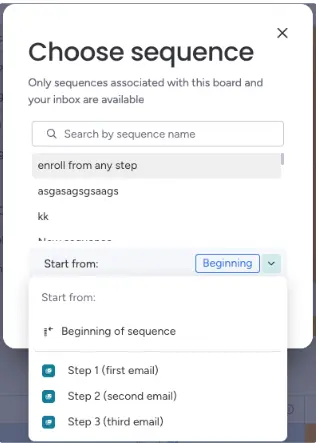
Sequences: Start from any point
Update status: fully rolled out
Users who create sequences can now include leads from any step in the sequence. This means that users can skip irrelevant steps, resume failed or interrupted contacts, and further personalise sequences. This allows for more targeted campaign customisation, personalised outreach, and more effective follow-up communication.
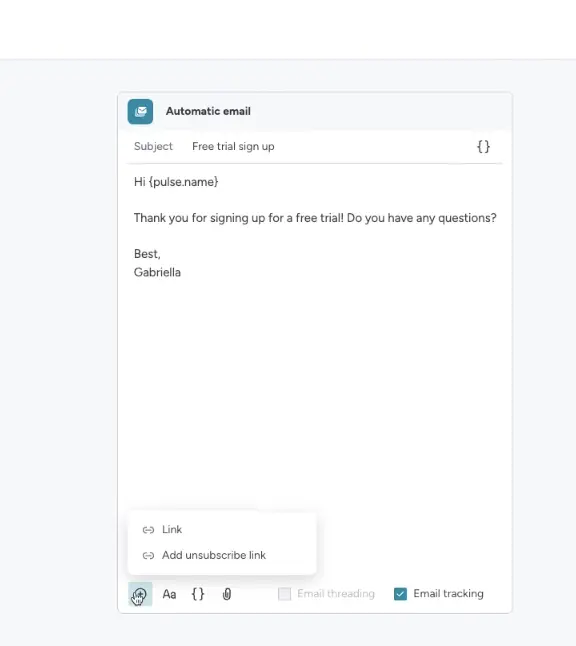
Sequences: Unsubscribe link & analytics
Update status: fully rolled out
monday Sequences now supports the insertion of an unsubscribe link in automated emails, including configurable settings and reporting. This ensures that email communication complies with applicable data protection laws while also increasing recipient trust.
monday dev
Sprint Recap Chart
Update status: fully rolled out
With the new Sprint Recap Chart, monday dev users get a clear, visual evaluation of each completed sprint. The comparison between the start and end states shows directly what has been completed, postponed, removed or added (scope creep). Ideal for productive retrospectives.
Use Cases
- Teams can see at a glance how effective a sprint was.
- Product owners can identify patterns and improve planning.
- Easily export and share sprint reports with stakeholders.
Gemini CLI Extension
Update status: fully rolled out
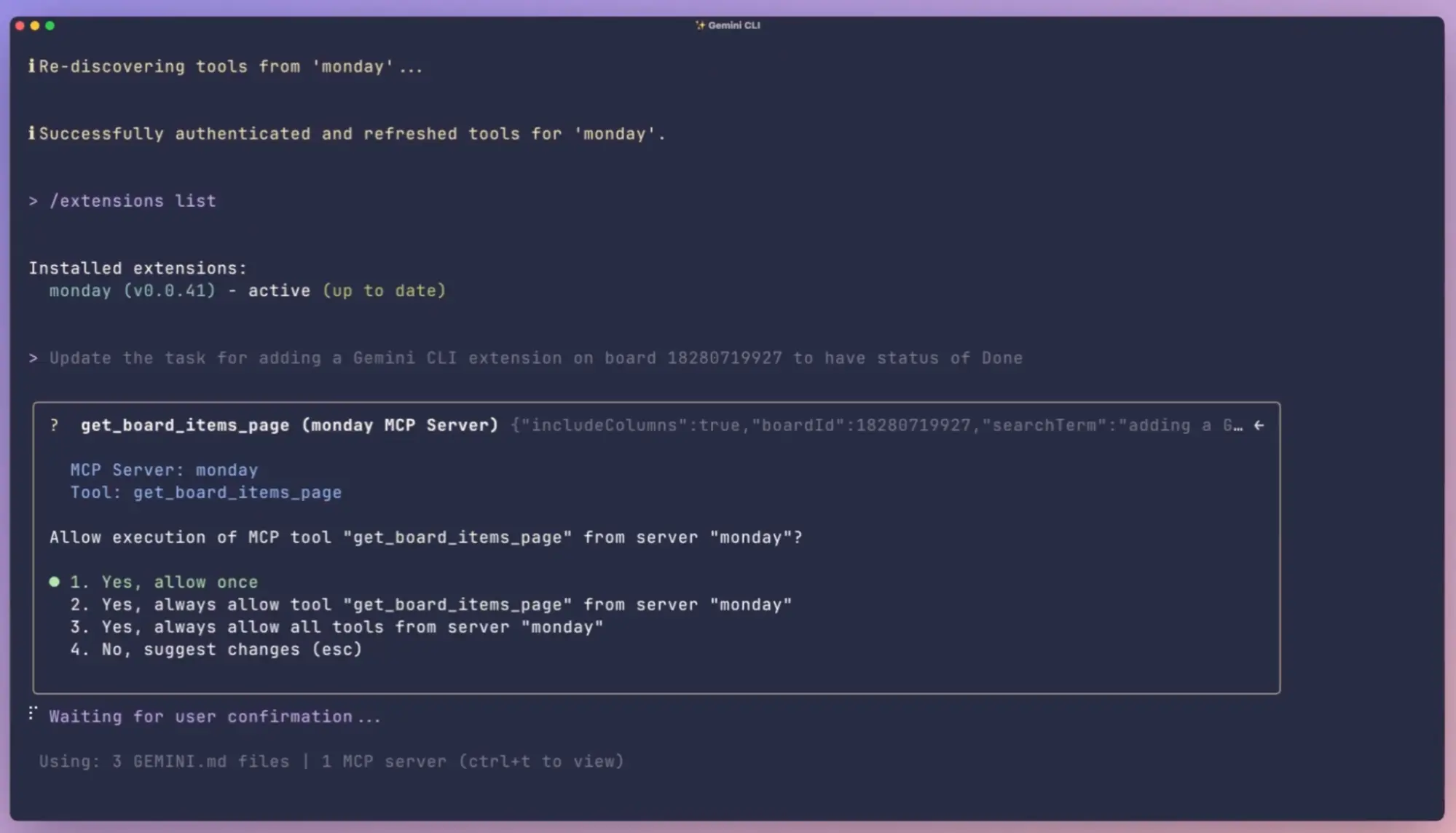
With the new Gemini Command Line Interface (CLI), developers can work with monday directly from the terminal – using natural language. Whether updating items, creating boards or retrieving tasks – everything now works seamlessly without switching to the UI. For developers in particular, this tool brings efficiency, AI support and a clear structure to their tasks – directly in the coding workflow.
monday Workcanvas
Improved item import experience for Canvas
Update status: fully rolled out
The import of monday items into WorkCanvas has been fundamentally redesigned. A modern interface, filter options by workspace and a searchable list view make the import process much more intuitive and faster. This update creates a noticeable efficiency gain, especially for teams that want to visually process large amounts of data.
Use Cases
- Project managers drag relevant tasks directly into the canvas to create visual roadmaps.
- Creative teams use the new selection function to transfer specific content from different boards into a single canvas.

Conclusion
The November updates show once again that monday.com listens closely to what teams really need in their everyday work. Whether it's more efficient automation, clearer visibility rules or more flexible form logic, many of the new features solve specific challenges and save valuable time in day-to-day business.
.svg)