

monday.com now includes a whole range of its own AI features—column-level AI blocks, a workspace assistant, and agents that take over tasks. For many standard use cases, this is perfectly sufficient, and the fastest way forward is to use exactly those tools.
Things get interesting where these features fall short: when a process requires your own logic, touches multiple systems, or needs to deliver a result in a format that no off-the-shelf component supports. In these cases, there are three ways to connect Claude and monday.com. They differ significantly in terms of effort and purpose and are frequently confused.
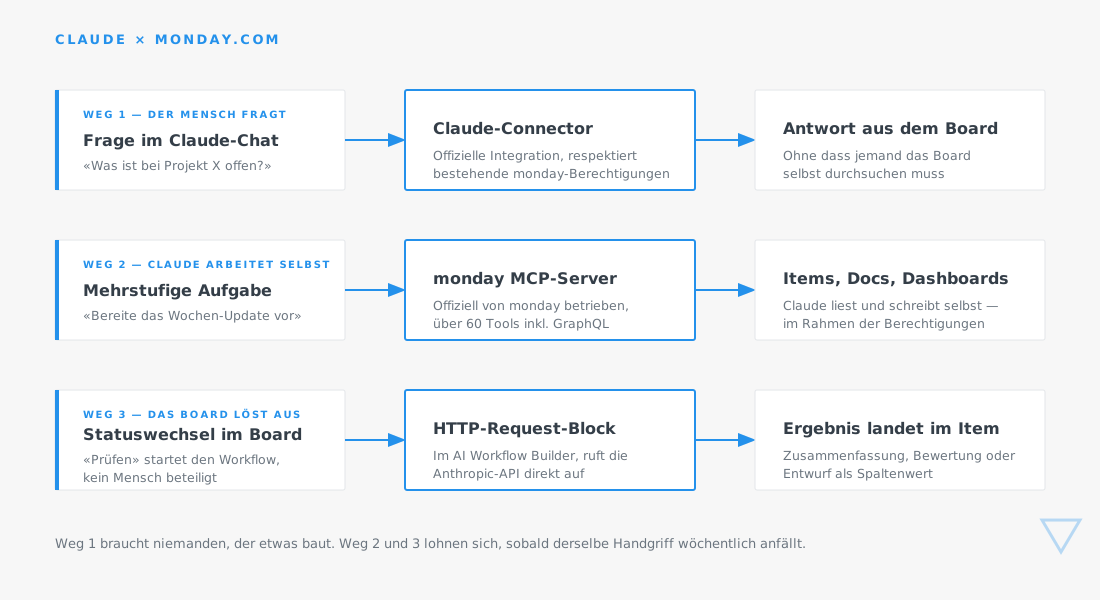
Option 1: The Claude Connector – human-led queries
Since 2025, there has been an official connector that allows Claude to access monday.com directly. Authentication is handled via OAuth, existing permissions are respected, and it is enabled by your administration via the marketplace. A Claude Pro plan or higher is required.
In everyday practice, this means: Someone asks in the chat, "What is still pending for the Meier project?" or "Summarize which deals are currently in negotiation this month"—and receives the answer from the board without having to click through various views themselves.
Effort: minimal. Approval by administration, login by users, and you're done. No development required.
Limitations: This is reactive. It only happens when someone asks. It does nothing for recurring processes.
When it makes sense: almost always as a starting point. Anyone using both monday.com and Claude should have this enabled before considering any custom development.
Option 2: The monday MCP server – Claude works autonomously
monday.com operates an official MCP server. Through it, more than sixty tools are available—boards, items, columns, documents, dashboards, workflows, user management, search, and even direct database queries.
The difference compared to Option 1 lies in the depth. Here, Claude can independently work through a multi-step task: searching for relevant items, loading additional details, compiling information, and creating a document. This is suitable for tasks like "prepare the weekly update for management"—a process that breaks down into individual steps that no one can define exactly in advance.
Effort: low to medium. The server exists, but it needs to be configured and enabled. The real work lies in determining which tools should be available – and which ones should be intentionally excluded.
Limitations: Every call counts toward your API limit. An agentic task involving thirty queries is noticeable. Furthermore, the server operates with the permissions of the logged-in user: if everyone in your account can historically see everything, Claude will see everything too.
When it makes sense: as soon as you have recurring tasks that require multiple steps across multiple boards.
Method 3: The HTTP Request block – the board triggers the action
The third method reverses the direction. Instead of a human asking Claude, an event within the board triggers the processing. For this, the AI Workflow Builder includes an HTTP Request block that can send GET, POST, and PUT requests to any address, using custom headers and authentication via the credentials manager.
This allows the Anthropic API to be called directly from a workflow. For example: an item changes to "Review," the workflow sends the description to the API, and the result is returned to the item as a column value. No one needs to initiate anything.
Effort: medium. The block itself is quick to configure, but you need API access, robust error handling, and a plan for what happens if a response doesn't arrive. Additionally, the AI workflow features require a Pro or Enterprise plan.
Limitations: This incurs ongoing costs per call, and there is no human checking in between. This is the wrong setup for results that go directly to external parties – but the right one for internal preparatory work.
When it makes sense: when the same task occurs weekly and the result is processed further internally.
Where it breaks down in practice
Three things that regularly come up in projects and that you should know beforehand.
Rate limits. A workflow that fires on every status change will suddenly produce hundreds of calls during a bulk import. Build in a condition to limit this, and calculate for the peak scenario – not the normal one.
Lack of error handling. If the API fails to respond, the field remains empty and no one notices because an empty field is inconspicuous. Define a visible error state, such as a dedicated status.
Maintenance for product updates. monday is rapidly expanding its AI capabilities, and terminology is evolving. What is a custom workflow today might be a standard feature in six months. Review your custom builds twice a year to see if they are still necessary—this saves on maintenance effort.
Our recommendations
The order of operations is almost always the same. First, use native monday AI features where they fit—they are already paid for and require no maintenance. Next, enable the Claude connector, as it provides immediate value without any development effort. Only when both reach their limits is it worth building custom connections via MCP or the HTTP block.
Incidentally, monday.com states that it uses several providers for its AI features, including Claude models. For you as a user, this is relevant in one key respect: it is not an either-or choice between the two worlds.
.png)

.svg)