
Die Blinno GmbH sind Claude Implementierungsexerpten und helfen dir die AI in deinem Unternehmen richtig einzusetzen.

Claude in the Workplace – From Experiment to Productive Practice

Claude is already in use at most companies today – just rarely in an organised, measurable and secure way. We bring structure to it: from use-case analysis through training and integration to your own skills, role model and governance.

The Short Version

Claude in 90 Seconds

Claude is Anthropic's AI assistant. For businesses, four building blocks matter – no more technical detail is needed to decide.

01

Models

Different model classes – from fast and low-cost through to complex reasoning for demanding, multi-step tasks.

02

Projects & Connections

Self-contained workspaces with their own knowledge base. Connectors link your systems via MCP – Claude works with your data instead of copy-paste.

03

Skills

Reusable capabilities with instructions, templates and scripts. Claude loads them automatically when they fit the task – your process knowledge becomes a function.

04

Claude Code & Agent SDK

For anything beyond chat: Claude carries out tasks independently, works with files and tools – even embedded in your own applications.

That was the technical part. The more interesting question is what you do with it – and how you roll it out in an organised way.

Why Rollouts Fail

The Problem Isn't the Technology

In almost every business we talk to, someone is already using AI. Yet little actually changes as a result. Usually for three reasons.

A Tool Without a Process

Licences are handed out, but nobody has defined which process is actually meant to get faster. Usage stays down to chance.

Shadow AI

Staff use private accounts because nothing official exists. Company data ends up in tools nobody has approved.

The Pilot That Never Scales

One department builds something impressive. Without a role model, training and an operating concept, it stays a one-off.

Our Approach

The Blinno Claude Framework

Four phases, one thread running through them. Each phase has a defined outcome, so you always know where you stand and what comes next. No big bang – controlled steps with measurable value.

01

Discovery

Understanding what's worthwhile

Use-case workshop
Readiness & risk check
Business case per use case
OUTCOME
Use-case map
02

Design

Solution and guardrails

Architecture & data flows
Governance & role model
Skill & prompt concept
OUTCOME
Implementation blueprint
03

Deploy

Building and rolling out

Setup, SSO & permissions
Build skills & connectors
Pilot with a real team
OUTCOME
Productive pilot
04

Drive

Embedding and scaling

Training & enablement
Adoption monitoring & KPIs
Roll-out to further teams
OUTCOME
Measurable adoption
1–2 weeks
2–3 weeks
4–8 weeks
ongoing

Discovery → Design → Deploy → Drive: from potential analysis to measurable adoption.

Phase 01 — Discovery

Understanding What's Worthwhile

We look at your processes and identify use cases with real leverage. Alongside that comes an honest readiness and risk check: where the data sits, who decides, and what must never happen.

Phase 02 — Design

Solution and Guardrails

Target architecture, data flows, the role and governance model, plus the concept for skills and connectors. The result is a blueprint you can actually implement – not a slide deck.

Phase 03 — Deploy

Building and Rolling Out

Setup, SSO and permissions, connecting your systems, building the first skills. Then a pilot with a real team and real tasks – not demo data.

Phase 04 — Drive

Embedding and Scaling

Training, internal champions, monitoring actual usage. What works gets rolled out to further teams. What doesn't gets adjusted or stopped.

Services

What We Offer Around Claude

Bookable individually or as full support across all four phases. Most clients start with consulting and training, then build from there.

Consulting & Strategy

Use-case and potential analysis along your processes
Readiness check: data, roles, legal framework, maturity
Business case and prioritisation – what first, what later, what not at all
Roadmap with milestones and responsibilities

Training & Enablement

Foundational training for teams that haven't started yet
Power-user workshops: using Projects, Connectors and Skills productively
Role-specific formats for sales, marketing, finance, support
Building internal champions who help colleagues along the way

Build & Integration

Setup, SSO/SAML, SCIM provisioning and permission structure
Connecting your systems: Microsoft 365, Google Workspace, CRM/ERP, monday.com
Custom MCP servers for internal data sources and APIs
Automations where Claude is one step in the workflow

Skills & Custom Agents

Skills for recurring tasks – your process knowledge as a function
Agents that carry out multi-step workflows independently
Templates, tone of voice and quality criteria built in
Versioning, testing and clear ownership in operation
Examples

What a Skill Looks Like in Practice

A skill isn't a chatbot. It's a fixed workflow that Claude carries out the same way every time – with your templates, your tone of voice and your quality criteria.

Use Case

Quotes and Cost Estimates

A requirements list becomes a structured estimate with a range, cost blocks and open questions – in your own template's layout.

Benefit: from hours to minutes, with consistent structure and less forgotten.

Use Case

Support and Enquiry Triage

Incoming enquiries are categorised, enriched with context from the CRM, and answered as a draft – sign-off stays with a person.

Benefit: shorter response times, consistent answers, less routine work.

Use Case

Project and Meeting Documentation

Transcripts and notes become a summary, decisions and tasks – logged directly as items on the project board.

Benefit: traceable projects, without anyone writing up minutes in the evening.

Use Case

Knowledge Search Across Your Own Records

Claude searches connected drives and systems and answers questions with a source reference instead of from memory.

Benefit: answers in seconds – and traceable back to their source.

Security & Governance

Introducing AI Without Giving Up Control

For leadership, this is usually the deciding question. We answer it across four levels – from people to systems. Technology alone isn't enough, and neither are policies alone.
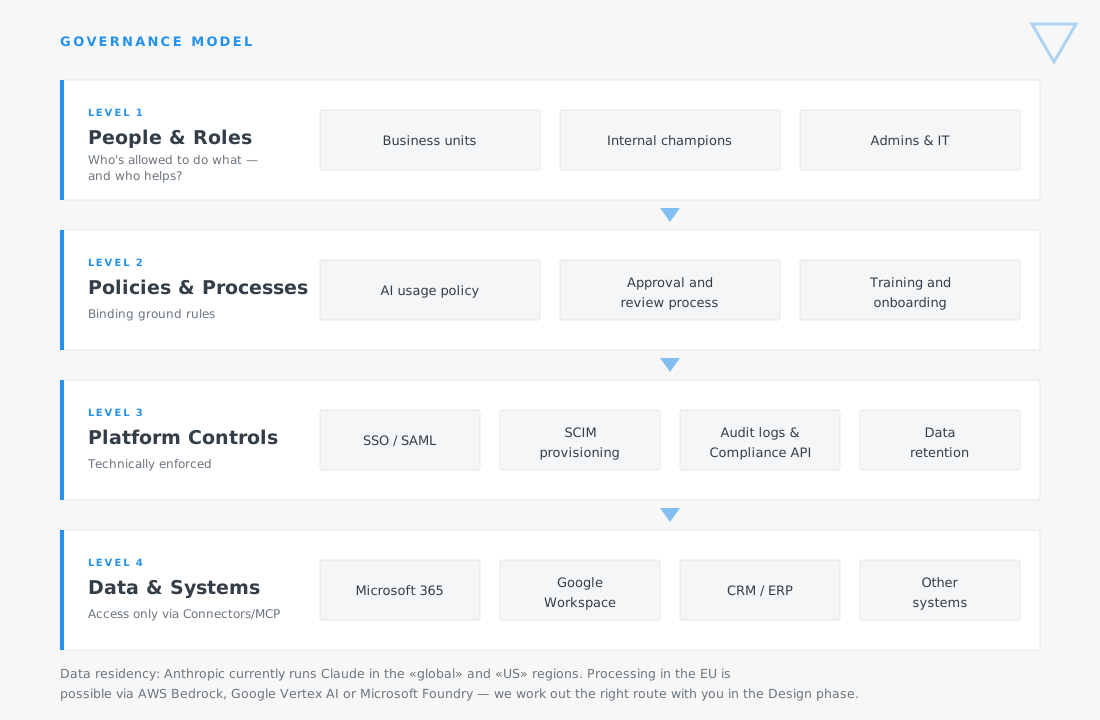
Data residency: Anthropic currently runs Claude in the «global» and «US» regions. Processing in the EU is possible via AWS Bedrock, Google Vertex AI or Microsoft Foundry – we work out the right route with you in the Design phase.

Governance model: each level has defined owners and checkable control points.

What Anthropic Brings – and What You Need to Define Yourselves

As of September 2026. All details from official Anthropic sources.

Certifications

SOC 2 Type I and Type II, ISO/IEC 27001:2022 and ISO/IEC 42001:2023 for AI management systems. HIPAA configuration with a BAA is possible. Evidence available via Anthropic's Trust Center.

Model Training

With commercial use (Team, Enterprise, API), your content is not used to train the models by default. For personal consumer accounts, that only applies with explicit consent – one reason shadow AI is a genuine risk.

Data Retention

In commercial use, inputs and outputs are deleted after 30 days by default. Enterprise customers can configure their own retention period (minimum 30 days). For API use, Zero Data Retention is available on request.

Data Residency

Anthropic currently runs Claude directly in the «global» and «US» regions – there's no Swiss region. Processing in the EU is possible via AWS Bedrock, Google Vertex AI or Microsoft Foundry. We work out which route suits you in the Design phase, before anything gets set up.

Administration

SSO/SAML with common identity providers, SCIM provisioning, roles and workspaces, usage analytics, and a Compliance API to connect to your SIEM.

Your Homework

An AI usage policy, an approval and review process, mandatory training, defined permitted data classes, and a named owner. That's exactly what we build with you – it's the part no platform does for you.

Client Voice
Placeholder – quote still to be delivered

„We didn't just buy Claude – we first understood where it would genuinely help us. Blinno guided us through that prioritisation and then set it up properly, including the rules for who's allowed to do what. Today our team works with it without us having to worry about data protection.“

Guido Specker
· Managing Director, INNOSourcing
Why Blinno

AI Isn't a New Line of Business for Us

We've been automating business processes for Swiss SMEs for years. Claude isn't an end in itself for us, but another building block in a landscape we already know well.

Process First, Tool Second

We first ask which process should get better. Often the best answer is automation without AI – and we'll tell you that too.

We Connect to What You Already Use

Microsoft 365, Google Workspace, your CRM or ERP, project and filing systems: Claude gets connected wherever your data and processes already run – via connectors, MCP, or directly through your system's API.

We Use It Ourselves

Our own quotes, research and internal processes run through Claude and our own skills. What we recommend, we've already used ourselves.

Book Your Free Introductory Call Now

tbd

Next Step

The Claude Readiness Check

Free and no obligation!
In 45 minutes, we'll look together at where AI is already in use at your business today, which two or three use cases would pay off fastest, and which governance questions you should clarify first. Afterwards you'll know whether and how a project makes sense – with no obligation.

No-Code steigert deine Effizienz im Unternehmen und bringt dich digital weiter.
FAQ

Frequently Asked Questions

Still not sure whether Claude is the right choice for your business? Here we answer some of the questions you might have:

We already use ChatGPT or Copilot. Why Claude?

It doesn't have to be either/or. Claude is particularly strong with long documents, multi-step tasks and connecting your own systems via MCP. In the readiness check, we look with an open mind at which tool fits which use case – and whether running both in parallel is even worthwhile.

How long does a rollout take?

Discovery and Design together typically take three to five weeks. A productive pilot is usually up and running after a further four to eight weeks. The roll-out to further teams then continues step by step.

What does it cost?

That depends on scope – a Discovery workshop sits in a different order of magnitude to a full rollout with your own skills. After the initial call, you'll get an effort estimate with a range and clear cost blocks. Anthropic's licence costs come on top, separately, based on plan and usage.

Does our data stay in Switzerland?

Anthropic doesn't currently offer a Swiss region. Depending on your requirements, processing in the EU is possible via AWS Bedrock, Google Vertex AI or Microsoft Foundry. We clarify your regulatory requirements in the Design phase and choose the delivery route accordingly – before anything is set up.

Do we need to clean up our data first?

No, but it helps. We deliberately start with use cases that work with what's already there today. We do structural data work where it has the biggest leverage – not as a precondition for getting started at all.

What happens if our staff don't get on board?

That's the most common reason rollouts stall – which is why the Drive phase is a fixed part of the framework. We train by role, build internal champions, and measure actual usage instead of assuming it.

Have more questions?