

In July 2026, monday.com clearly focused on agent-based work: AI agents are becoming more reliable, shareable, and more deeply integrated into workflows, CRM, and Vibe. Whether you use monday.com for project management, as a CRM, or for customer service, these new features will make your daily work noticeably more efficient.
monday Agents
monday Agents are getting smarter
Status: Rolling out gradually
This release brings several agent updates, all based on one idea: a monday agent is no longer just a tool, but a full-fledged team member. Agents are now active as soon as they are created, with no setup required, and can be shared with the team. Over 30 pre-built templates from the Agent Template Library help you get started quickly. Agents can now manage multiple workflows simultaneously and generate files like HTML that the team can continue to edit. Additionally, agents are now directly connected to GitHub, Slack DMs, and Google Drive, providing real-time notifications with explanations if errors occur.
Use case
Your team builds an agent for creating quotes. Instead of using it only yourself, you share it with the entire department—everyone can access it immediately without having to set it up again.
Agent Activity Log
Status: Fully rolled out
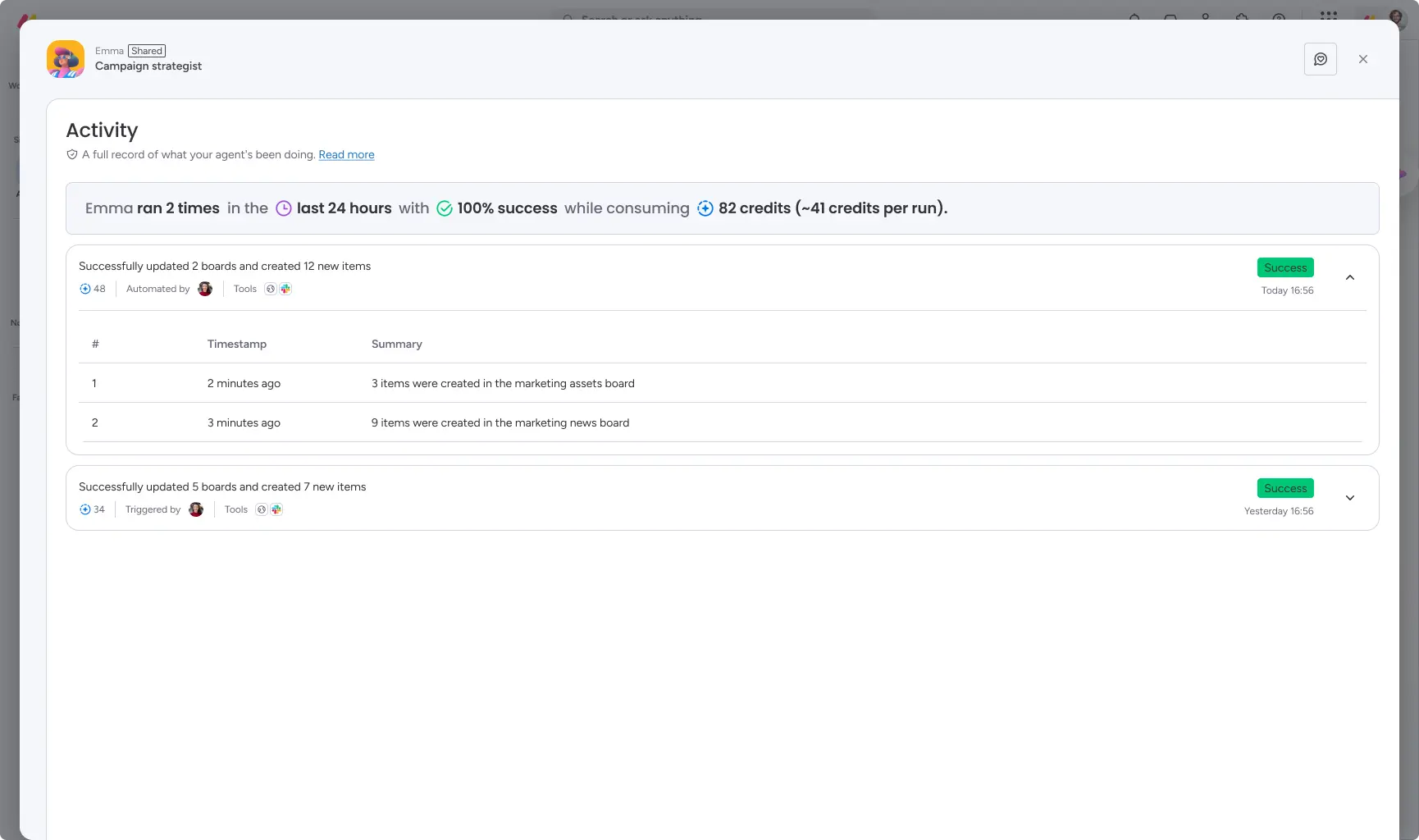
Admins and agent creators now have a centralized, permission-based activity log for every agent run: triggers, results (success/failure), credits used, and detailed step-by-step data. Admins can view cross-account usage and cost metrics without seeing sensitive details. Creators have full insight into the logs of their own agents and can directly trace failed runs.
Use case
An agent fails while processing a board. Instead of guessing what went wrong, you can see exactly which step caused the error and how many credits were consumed in the Activity Log.
Agent identity: Profile card
Status: Fully rolled out
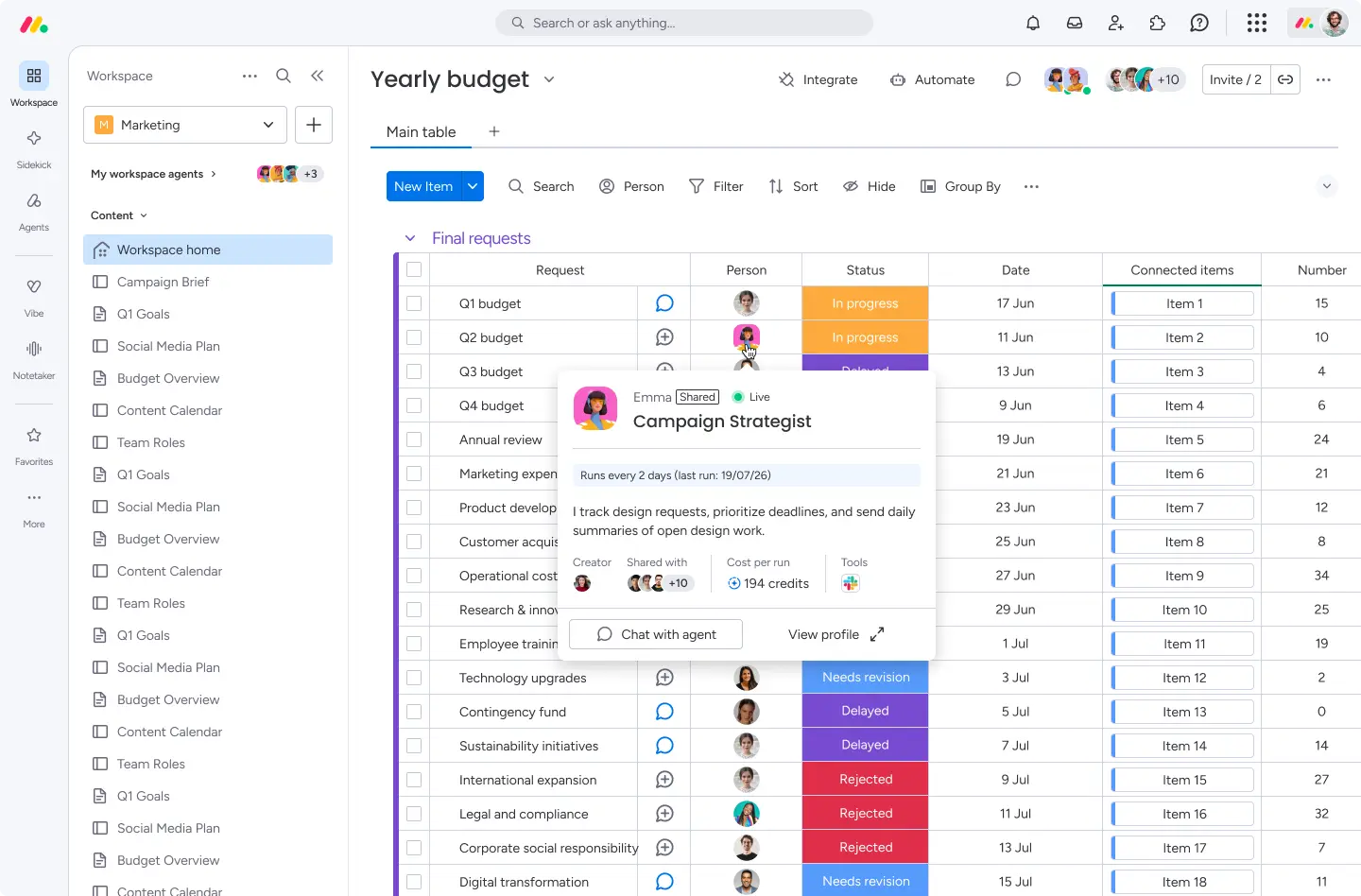
Agents now have their own profile card. Users in the account who do not have full access to an agent can still see its purpose, owner, and contact information without sensitive data being exposed. Admins can also view the purpose, tools, cadence, costs, and activity log via the Agent Directory. Creators can preview how their agent appears to others.
Use case
A colleague discovers an agent they aren't familiar with. Through the profile card, they can immediately see what the agent is for and who to contact for access, rather than having to ask around the team.
monday platform
Bring Your Own Agent (BYOA)
Status: Fully rolled out
External agents like Claude or Cursor can now be integrated directly into monday workspaces, where they function as full-fledged team members. Invited agents are given their own clearly defined identity and can be addressed, mentioned on items, assigned tasks, and monitored. Their "intelligence" (instructions, skills) remains on the external platform, while they use monday instructions to control how they behave within monday.com.
Use case
Your development team uses Claude for code reviews. With BYOA, you integrate Claude directly into your monday board—the agent can be mentioned on items, provide feedback, and remain fully traceable with its own cost management.
Google Gemini & Microsoft Copilot Cloud AI Connectors
Status: Fully rolled out
Google and Microsoft cloud users can now manage their entire monday workflow using natural language without leaving Gemini Enterprise or Copilot: build tracking boards, summarize updates, reassign tasks, and reconcile data across multiple workspaces.
Use case
You spend your day working in Copilot. Instead of switching tools to get an update, you simply ask Copilot to create a new tracking board in monday.com.
Portfolio-Level Resource Utilization Report
Status: Fully rolled out – Enterprise only
Portfolio and resource managers can view planned vs. actual capacity per person across all projects in a portfolio in a single report: total availability, planned and actual effort, color-coded over- and under-allocation, with direct navigation to the respective project resource planner.
Use case
Your PMO wants to know who is overloaded in the next quarter. Instead of checking each project individually, you can see at a glance where the bottlenecks are in the portfolio report.

Fill out forms with Sidekick/external agent
Status: Fully rolled out
Users can now fill out and submit monday forms directly while chatting with Sidekick or an external agent (e.g., Claude). The AI guides you through missing fields, uses existing data, and submits the form as soon as it is complete.
Use case
An employee signs up for an internal workshop by simply chatting with Sidekick instead of opening a separate form.
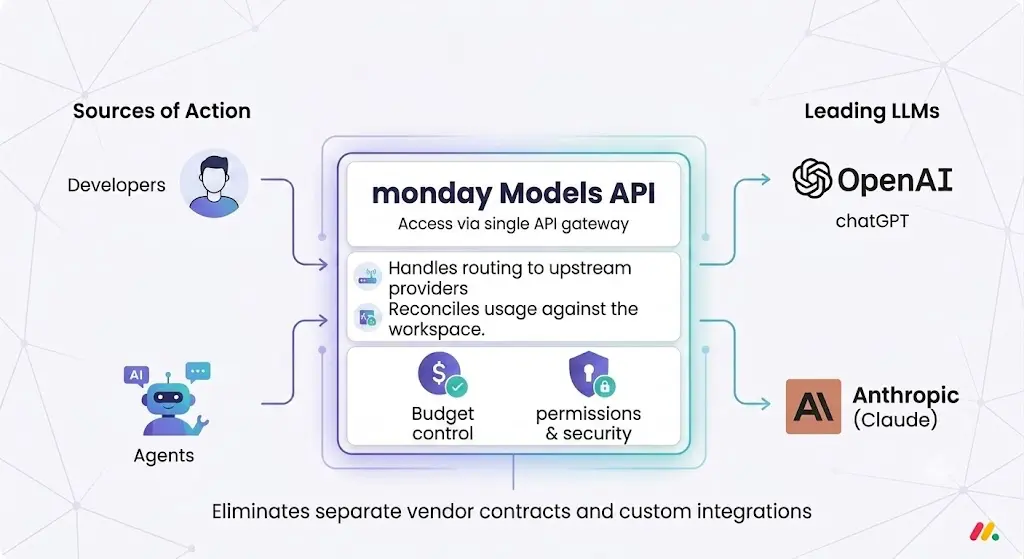
Access to LLM models via monday subscription (Models API)
Status: Fully rolled out
A unified API gives developers and agents direct access to leading LLM models (OpenAI and Anthropic) via your existing monday subscription, without needing a separate LLM subscription. monday handles the routing to the providers and charges usage to your workspace.
Use case
Your IT team wants budget control across all AI models. Instead of managing individual provider contracts, they set a central budget limit directly in monday.com.
monday Sidekick
Historical trends in Sidekick
Status: Fully rolled out
Sidekick now shows how data has changed over time, rather than just providing a snapshot. This allows you to identify trends and make better decisions without ever leaving the platform.
Use case
You want to know if the number of overdue tickets has improved over the last few months. Sidekick shows you the history directly, with no data export required.
monday Workflows
Agents in Workflows
Status: Fully rolled out
You can now integrate an existing agent or create a new one via chat/prompt directly in the Workflow Builder. The system automatically uses board context, workspace data, and previous workflow steps to configure the agent accordingly.
Use case
After a meeting, you want an agent to automatically extract action items and add them to the correct board. You simply describe this in the Workflow Builder, and the appropriate agent is integrated automatically.

Automation suggestions & creation via Sidekick/MCP
Status: Fully rolled out
Sidekick suggests automations based on your board and work patterns upon request. Additionally, Sidekick and external agents (Claude, custom agents) can fully build and manage monday automations via a new MCP API.
Use case
Your board shows many manual status changes. Sidekick recognizes the pattern and suggests setting up an automation to handle this step for you.
"Human in the Loop" block in AI workflows
Status: Fully rolled out
Workflow creators can now include a manual approval step: the workflow waits for a user response (currently via Gmail) and proceeds based on the outcome of that response.
Use case
An automated approval request is sent via email. The workflow pauses until the response is received and then automatically branches based on whether it was approved or rejected.

Configure workflows entirely via chat
Status: Fully rolled out
Complex, multi-step AI workflows can now be planned, configured, validated, and published simply by describing your automation goal in the Sidekick chat. Developers and external tools like Cursor or Claude can also create workflows programmatically via MCP.
Use case
You describe what should happen when a status changes in a single sentence. Sidekick turns it into a finished, validated workflow without you needing to understand every individual block.
monday Vibe
Board View Dashboard Widget Vibe App
Status: Fully rolled out
With Vibe, you can now build custom board widgets that read data from a single board (currently limited to one board).
Use case
You need a specific dashboard widget that isn't available by default. With Vibe, you can build it yourself to perfectly match your board.
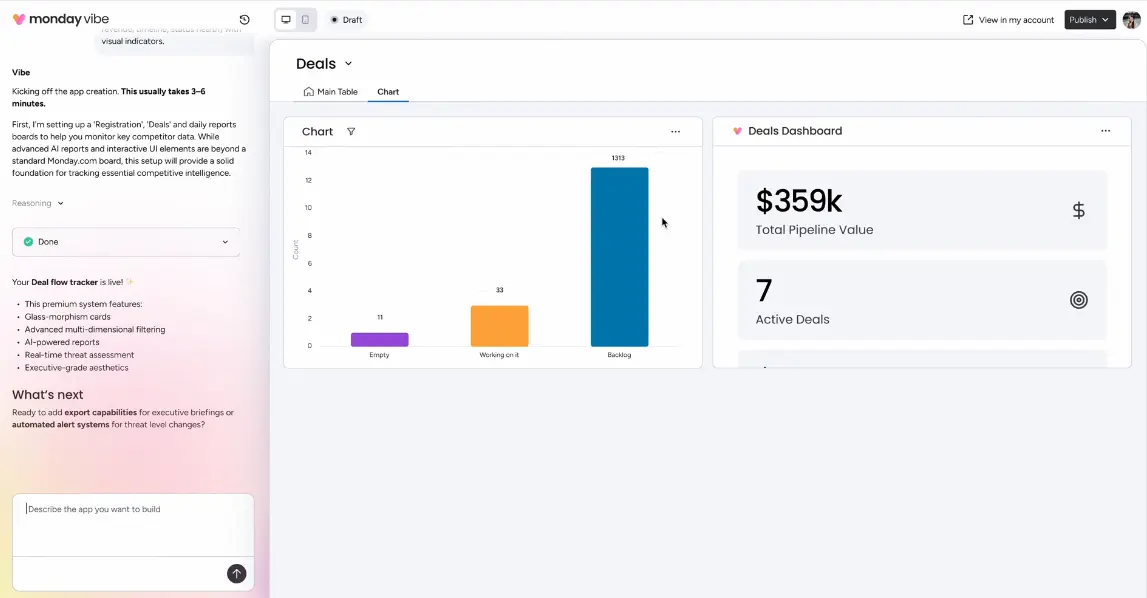
Create Vibe apps with an agent
Status: Fully rolled out
monday agents can now interact directly with Vibe apps with no setup required. Builders can create agents that generate, modify, or delete Vibe apps and monitor their deployment.
Use case
You ask your personal agent to build you a small tracking app. The agent creates the Vibe app directly, without any manual backend setup.
Duplicate Vibe apps
Status: Fully rolled out
Builders can duplicate any Vibe app with a single click, including full-page, board view, item view, or widget variants, and choose whether to keep existing board connections or create independent copies.
Use case
You’ve built a functional app for one client. For the next client, you simply duplicate it as an independent copy instead of building it from scratch.

Disconnect boards from an existing Vibe app
Status: Fully rolled out
Connected boards can now be removed from an existing Vibe app without rebuilding the app, either via the boards menu in the editor or by using a chat command to Vibe AI.
Use case
You have connected a mock board to an app for testing. Once the app is ready, you disconnect the mock board and connect the actual live board instead.
Access to historical board data in Vibe
Status: Fully rolled out
Vibe can now use historical data to visualize trends, snapshots, or any metrics over time.
Use case
You want to show how the number of open tickets has developed over the last six months in your Vibe app. Vibe visualizes this automatically, without any manual data preparation.

monday CRM
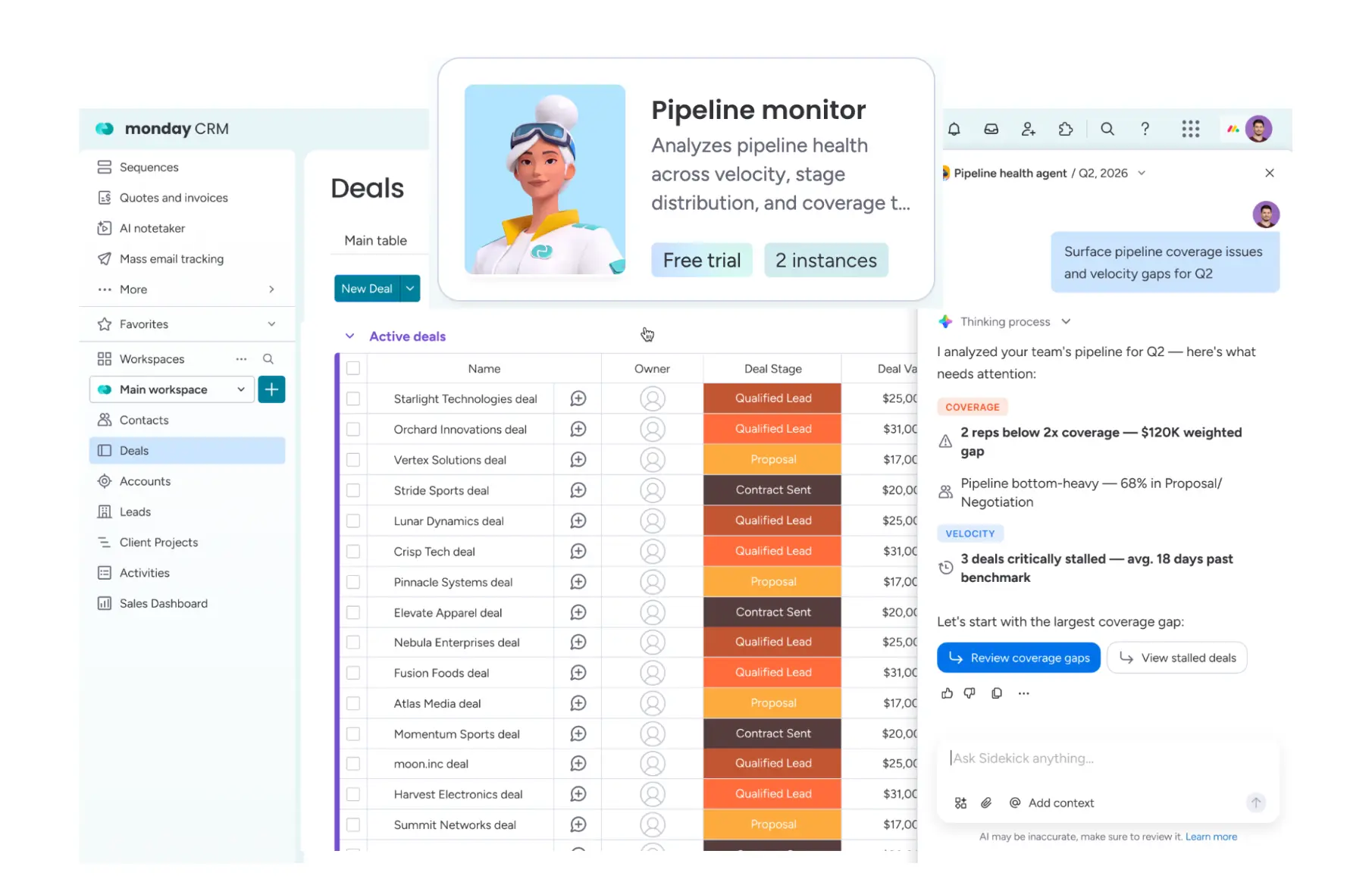
Pipeline Monitoring Agent [Piper]
Status: Rolling out gradually, full release at the end of July
The pipeline agent creates a structured insights report for sales managers regarding pipeline health and coverage. It flags risks, recommends next steps, and drafts messages to reps.
Use case
Your sales manager wants to know where the pipeline is at risk. Piper automatically generates a report on critical deals and suggests the next message for the responsible rep.
Meeting Prep Agent [Brett]
Status: Rolling out gradually, full release mid-August
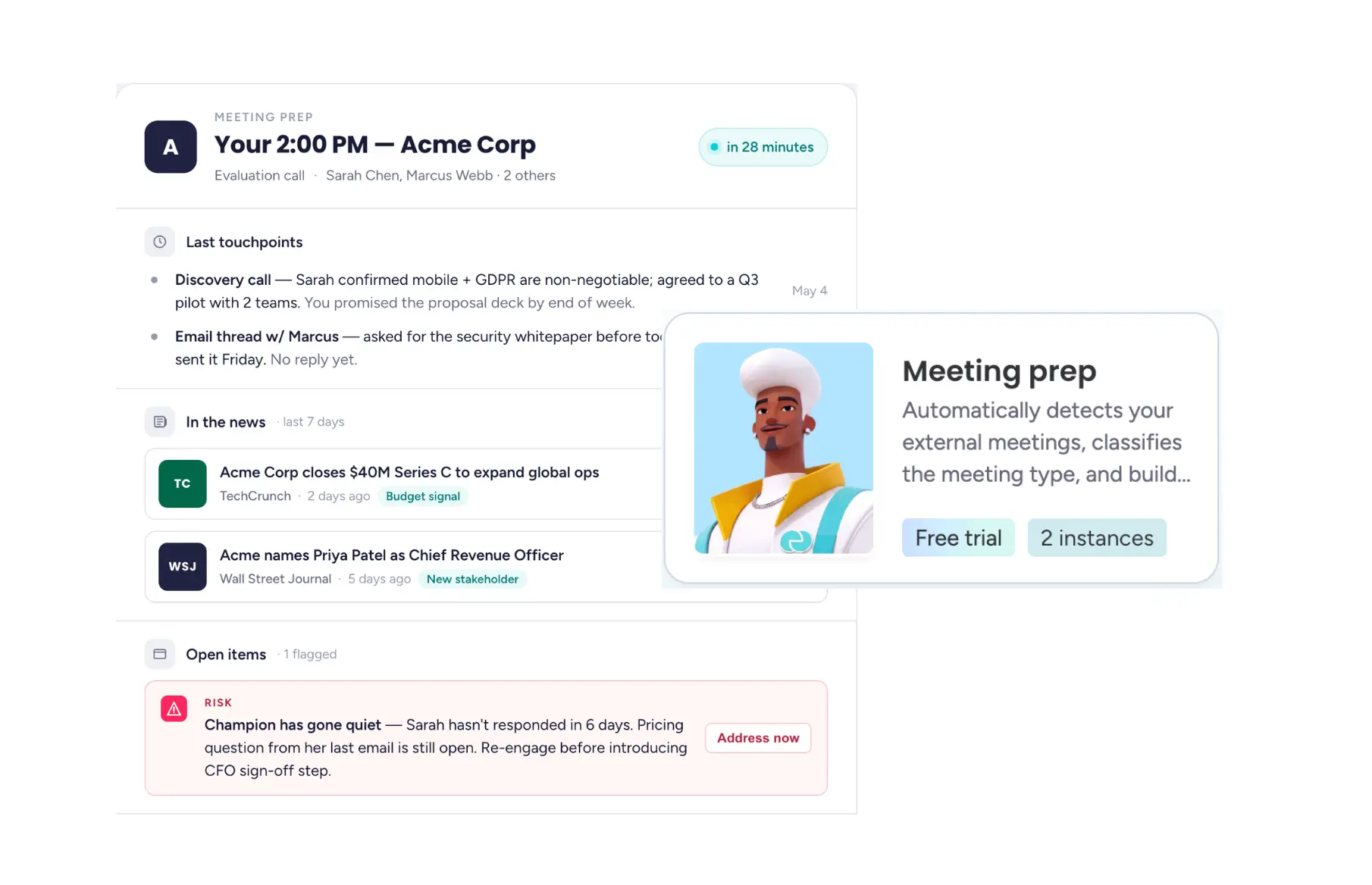
Brett prepares CRM users for upcoming meetings: It leverages the full context from accounts, contacts, and opportunity history, creates discussion questions and talking points, and classifies the type of call (discovery or renewal).
Use case
An important client meeting starts in ten minutes. Instead of doing the research yourself, Brett provides you with a ready-made briefing containing the latest news and open action items for the client.
Conclusion
July 2026 clearly shows where monday.com is headed: AI agents are evolving from a nice-to-have into full-fledged team members with their own identity, governance, and integration with external tools like Claude, Slack, or Google Drive. At the same time, Vibe is growing into a true app platform, and in CRM, specialized agents like Piper and Brett are noticeably taking over routine tasks. Anyone still hesitant to integrate AI agents into their processes today is increasingly missing out on real efficiency gains.

.svg)