

The question “Make, n8n or Power Automate?” can’t be answered in a blanket way, because the three tools are built for different starting points. This article compares them along the criteria that decide success or frustration in practice, and shows which tool fits which type of company.
Why a neutral comparison matters
Automation tools are often chosen by gut feeling, or picked because that’s the tool the team already knows. That regularly leads to poor decisions: an enterprise with strict compliance requirements picking a pure cloud SaaS tool, or an SME with no IT department choosing a solution that assumes programming skills. The comparison below rates Make, n8n and Power Automate across eight criteria that are actually decision-relevant for most companies.
Comparison table
Note: prices, quotas and feature details change regularly. The official pages are authoritative: Make pricing, n8n pricing, and the Microsoft Power Automate pricing page (as of September 2026).
Make in detail
Ideal if:
You want to connect a huge range of standard and niche apps without an in-house IT department, a visual editor matters for fast iteration, and a predictable, well-scalable cloud offering is enough.
A common misconception is that Make is “just” a no-code click tool. That hasn’t been true since the Code App arrived. Your own JavaScript and Python logic runs directly in the scenario, common libraries such as lodash, moment.js, pandas and requests are available, the Enterprise plan lets you import any third-party libraries, and runtime increases from 30 to 300 seconds. Via the MCP client, a scenario can also talk to external tools and AI systems.
Probably not if:
Your data must stay in-house for regulatory reasons, or if you want to run and version the entire platform yourself.
n8n in detail
Ideal if:
Data protection and data sovereignty are core requirements, for example in regulated industries or with sensitive customer data, and the team has the developer know-how to run and maintain a self-hosted environment. n8n is also strong for companies that want to build complex, code-heavy automations.
Probably not if:
there are no IT resources available to run, update and secure a self-hosted instance. n8n’s cloud version softens this somewhat, but brings back the same trade-off as with other cloud tools.
Power Automate in detail
Ideal if:
It’s about simple, individual workflows within Microsoft 365: approvals, notifications, document filing, one flow per employee. Integration with SharePoint, Teams, Outlook and Dataverse is mature, many licences are partly covered by existing Microsoft 365 contracts, and flows fit seamlessly into existing access rights.
Probably not if:
the automation grows beyond simple workflows. This is exactly where the most important limitation from our project experience lies: as branching increases, flows in Power Automate become increasingly hard to follow, debugging gets time-consuming, and maintenance gets expensive. Even if most of your tools sit outside the Microsoft world, premium connectors are quickly needed, and licence costs per user or per flow add up.
Worth noting: Power Automate is a good tool for what it’s built for. The question isn’t whether it works, but how well it grows with you.
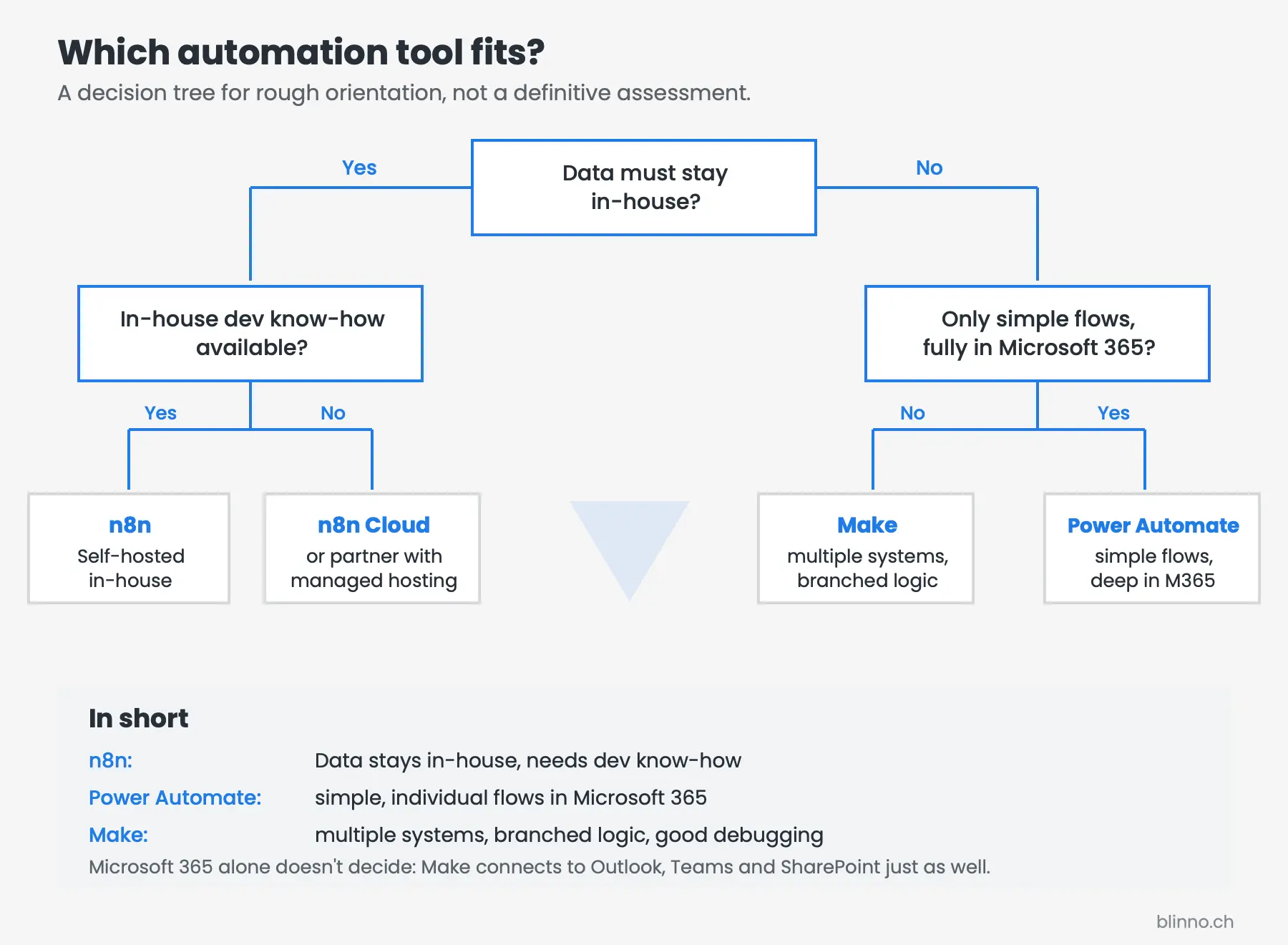
Decision logic by company type
SMEs without their own IT department
For smaller companies without dedicated IT, Make is usually the most pragmatic starting point: visual editor, broad app selection, no need to run your own infrastructure. Power Automate is a valid alternative if the company already works entirely within Microsoft 365.
SMEs with their own IT
If the company has developer resources in-house, self-hosting n8n becomes an option. That’s worthwhile in particular when data sovereignty matters, or when automations need to go beyond what a visual editor comfortably covers. Even here, Make often remains the more efficient choice for the “quick” processes; combining both tools is common in practice.
Enterprises with high compliance requirements
With strict governance and compliance requirements, the Enterprise tiers of all three providers come into focus: SSO/SAML, environment separation, audit logs, role-based access control. n8n also offers the option of running the entire infrastructure in your own data centre or a controlled cloud environment, which can be decisive where data residency requirements are particularly strict. If the enterprise is already heavily geared towards Microsoft governance tools (Entra ID, Purview, Conditional Access), Power Automate plays to its strengths through deep integration with those tools.
Microsoft 365 companies
This point deserves some clarification, because it’s often overrated as a criterion: practically every company works with Microsoft 365 today, and yet many of them still use Make. Using M365 alone is therefore not a decision criterion, since Outlook, Teams, SharePoint and OneDrive connect to Make without any detours.
What matters is the type of workflow. If it stays simple and takes place entirely within Microsoft, for example an approval followed by filing, Power Automate is the obvious choice and often already licensed. As soon as multiple systems, branched logic, error handling or high volume come into play, our project experience points towards Make: the flow stays readable, errors can be traced in the log per module, and maintenance stays affordable. A common split is therefore: Power Automate for personal, Microsoft-internal flows, Make as the automation backbone for everything that crosses system boundaries.
Real-world example: combination instead of either/or
In practice, companies often don’t rely on a single tool for everything, but combine strengths: Power Automate for internal approval processes within Microsoft 365, Make for connecting external customer and marketing tools, and n8n for individual, data-protection-critical routes that must run in-house. This combination requires a clear architectural decision about which system is responsible for which processes, so that no duplicate or conflicting automations arise.
✨ AI generated content

.svg)