

Make has renamed its billing unit: what was called Operations for years has been called Credits since the end of August 2026. For most scenarios, nothing changes in the maths, but for AI modules it does. This article shows how Make.com pricing works in 2026, what the switch actually means and where the typical cost drivers sit.
From Operations to Credits: what has changed
Make doesn't sell software licences, it sells consumption. Until summer 2026 the unit was called an Operation; it's now called a Credit. The switch happened 1:1: 10,000 Operations became 10,000 Credits, and plan prices stayed the same.
Important in practice, because many guides and internal calculations still use the old term:
The term Operation hasn't disappeared: it still refers to a single module run. It's just no longer the billing unit, Credits are, and the two figures are no longer necessarily identical.
Where a Credit costs more than an Operation
The practical difference is with AI. Three cases to distinguish:
- Standard modules (CRM, Sheets, Slack, HTTP, Filter, Router): 1 Credit per run, regardless of data volume or file size.
- AI modules with your own provider key (OpenAI, Anthropic and similar, connected with your own account): 1 Credit per run. You pay the token costs directly to the provider, not through Make.
- Make's own AI features and AI Agents: dynamic consumption. Depending on the model and token volume, a single call can cost several times one Credit.
If you bill AI steps through Make instead of your own provider key, measure this item with real data before going live. An agent that makes several tool calls per run behaves completely differently in terms of consumption than a classic module.
The plan structure
As of September 2026, the authoritative source is always make.com/pricing:
The starting price applies to the smallest quota at each tier. The quota can be scaled up within each tier, from 10,000 to several million Credits per month. Make grants a discount of roughly 15 percent for annual billing.
As you move up a plan tier, you also get functional benefits on top of more Credits:
- shorter execution intervals
- more simultaneous executions
- prioritised compute time
- longer log retention
- custom variables, and from Teams upward, role management
The typical cost traps
Surprising bills rarely come from the number of scenarios, but from their internal structure. Five patterns come up most often in practice.
1. Iterator and Aggregator
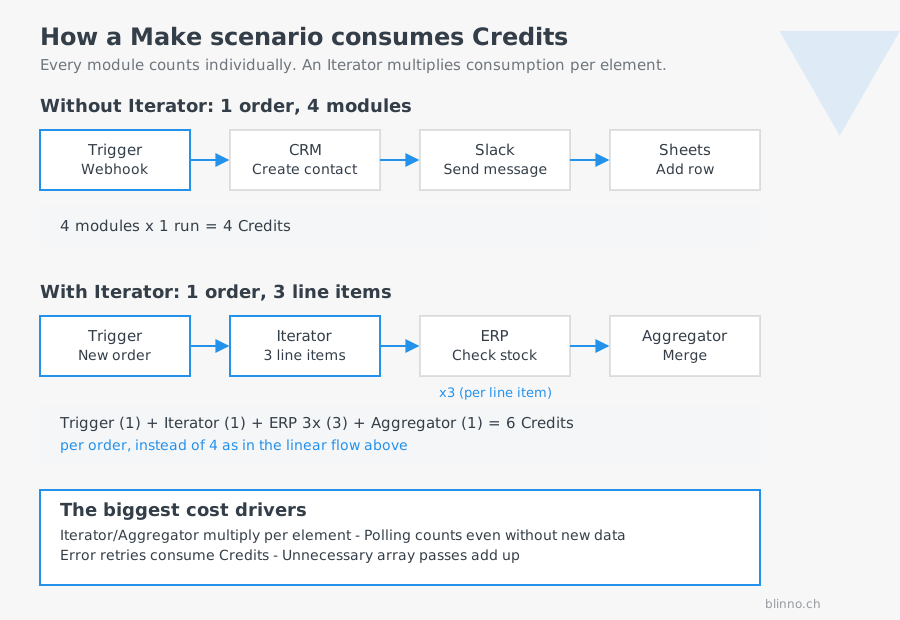
An Iterator breaks an array into individual elements so each can be processed separately, for example 50 rows from an Excel file. Every element that then passes through another module consumes its own Credit. A scenario that reads 50 rows and runs three modules per row quickly generates 150 Credits or more from a single run. The Aggregator also counts per run.
2. Polling instead of webhook
Many integrations can be connected via webhook (the source notifies you) or via polling (Make asks at fixed intervals). Polling consumes Credits even when there's nothing new. At a 5-minute interval, that's theoretically up to 288 requests per day per scenario, regardless of actual data volume.
3. Error loops and retry logic
A scenario without clean error handling that restarts repeatedly after a failure, or gets stuck in a loop, can multiply consumption within a few hours. Retry attempts usually count too, even when they ultimately fail.
4. Unnecessary array processing
If a data structure is repeatedly run through Iterators and Filters when a single aggregation or database call would have done the job, consumption multiplies at every step. This happens often in scenarios that have grown over the years and were never cleaned up.
5. AI modules without measurement
The new cost trap since the Credit switch. An AI step billed through Make no longer has a fixed price: the longer the prompt and response, the more Credits. For an agent that makes several tool calls per request, this adds up quickly. If you use AI in production, measure consumption per run before letting the scenario loose on full volume.
Two worked examples from practice
The examples are deliberately kept simple so the maths stays easy to follow. Both use only standard modules, for which 1 Credit per run still applies.
Example A: Forwarding leads from a form
An SME forwards leads from a web form into its CRM, notifies sales via Slack, and creates a spreadsheet entry.
- Trigger (webhook, new form entry): 1 Credit
- CRM: find or create contact: 1 Credit
- CRM: create deal: 1 Credit
- Slack: send message: 1 Credit
- Google Sheets: add row: 1 Credit
One run consumes 5 Credits. At 40 leads a month that's 200 Credits, at 300 leads it's 1,500 Credits. A webhook-based scenario like this stays within the cheapest paid quota even with significant growth.
Example B: Daily stock reconciliation with polling and an iterator
Another SME reconciles daily stock levels between an online shop and an ERP spreadsheet. The scenario polls every 15 minutes and processes several line items per order individually.
- Polling trigger every 15 minutes, around the clock: 96 requests a day, even with no new data: 96 Credits/day
- With 20 orders a day at 3 line items each: the Iterator generates 60 elements
- Per element: check ERP stock (1) and update it (1): 120 Credits/day
- Aggregator: 20 Credits/day
- Writing order status back to the shop: 20 Credits/day
Total: roughly 256 Credits a day, or around 7,680 Credits over 30 days for this one scenario alone. Add two or three similarly built scenarios, as is common in setups that have grown over time, and the entry-level quota is exhausted, even though the actual business volume of 20 orders a day stays modest.
The comparison shows the core problem: it isn't business volume that determines the cost, it's how the scenario is technically built.
Five levers to cut Credit consumption
- Use webhooks instead of polling wherever the source supports it. This eliminates the constant empty requests entirely and is the single most effective lever in the second example.
- Choose polling intervals deliberately. Where no webhook is available, a 30- or 60-minute interval is often enough instead of 15 minutes. That alone cuts polling consumption to a quarter.
- Check for batch processing instead of single-item iteration. Some target systems offer bulk endpoints that process several records in a single module call.
- Set filters as early as possible. Right after the trigger, not after several processing modules that would otherwise run for irrelevant records too.
- Connect AI via your own provider key. If you connect OpenAI or Anthropic with your own account, you pay Make just one Credit per call and pay token costs transparently to the provider, instead of both being mixed into your Credit quota.
Combined, this often saves 30 to 50 percent in existing scenarios, without changing anything about the result for the end user.
Where an audit is worth it
A scenario audit is worth it when Credit consumption grows faster than business volume, when an upgrade to the next plan tier is coming up without it being clear whether it's actually needed, or when AI modules are about to go live and consumption hasn't been measured yet. In practice, two or three structural adjustments are often enough to stay on the current plan.
✨ AI generated content

.svg)