

A Make scenario that has run without errors for months can fail at a single point at any time, without anyone noticing. Without an error handler, Make simply stops the execution and waits for the next trigger. This article shows how to use directives, retry strategies and alerting to build scenarios that are ready for production.
What happens without an error handler
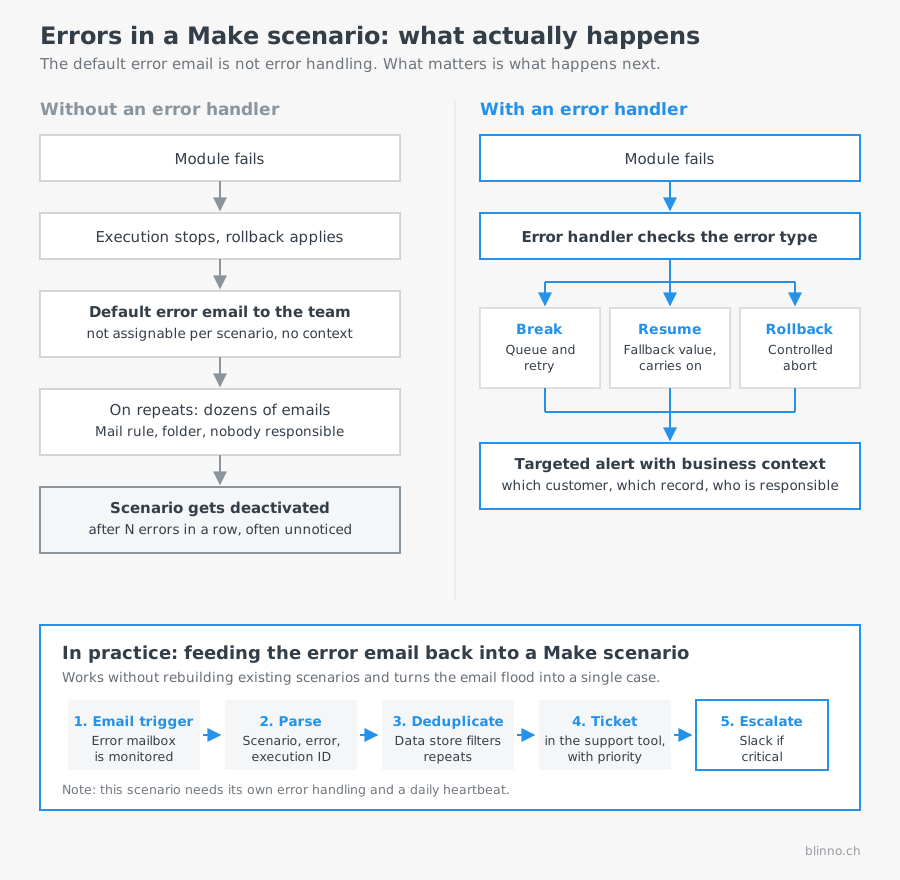
If a module fails and there is no error route, the execution is aborted immediately. By default, the Rollback directive applies implicitly: steps that have already been committed are rolled back and the execution is marked as failed.
Make does not leave you completely in the dark, as it sends an automatic error email. But that is exactly where the real problem lies, and in practice it is bigger than the missing notification itself.
Why the default error email is not enough
Make's automatic notification cannot be controlled in a granular way. It cannot be assigned to a specific person per scenario, and depending on the team set-up, the emails reach several people at once. Any team that has worked with Make for a while knows the result:
- When an error repeats several times, dozens of identical emails arrive.
- Nobody is formally responsible, so nobody feels responsible.
- After two weeks, a mail rule moves that sender address into a folder. From then on, the error is effectively invisible.
- The email contains no business context: it says which scenario stopped, but not which customer, order or record is affected.
There is also a second mechanism: in the scenario settings, “Number of consecutive errors” determines after how many errors in a row Make deactivates the scenario automatically. If this goes unnoticed, the process does not run at all for days, and it only becomes apparent when someone misses the data.
The right conclusion is therefore not to switch on even more notifications, but to define what should happen when an error occurs: which type of error is handled how, where the case ends up and who deals with it.
The five error handler directives
An error handler is attached to a module (right-click, “Add error handler”) and defines its own error route. At the end of this route, a directive determines how the overall execution behaves.
As a rule of thumb: Break for anything that will probably work on a retry; Resume or Ignore for optional, non-critical steps; Rollback or Commit wherever the consistency of the committed data comes first.
Incomplete Executions and automatic retries
If a module uses the Break directive, the failed execution lands in “Monitoring → Incomplete Executions”. For the typical error types there (rate limit, connection errors, module timeout), Make automatically tries to restart the execution at exponentially increasing intervals: after 1 minute, then 10, 10, 30 minutes and on to intervals of up to 3 hours. A maximum of three incomplete execution retries run in parallel per scenario, to prevent a retry storm from triggering new rate limit errors itself.
For errors handled through an explicit error handler with the Break directive, you can configure the number of retry attempts (1 to 10) and the interval between attempts (in minutes, fixed rather than exponential) yourself. The queue shows the failed module, the error message, the bundle data and the number of attempts so far. Entries can be retriggered manually, edited before the next attempt or deleted. How long entries are kept depends on the plan, and is shorter on the free plan than on paid plans.
Setting up monitoring and alerting
An error handler alone does not solve the visibility problem. Only an active notification turns errors into something you actually see.
Error route with Slack or email notification
Add an error handler to critical modules and send a message to Slack or by email within the error route. Use the built-in error variables:
{{error.message}}: human-readable error description{{error.type}}: error category, such as RuntimeError{{error.subtype}}: specific error code, such as RateLimitError or NotFound
This way you see immediately which module failed in which scenario and why, instead of having to search the execution log manually.
Feeding error emails back into a Make scenario
One approach that we use at Blinno ourselves, and that works without rebuilding existing scenarios: Make's default error emails are forwarded by a forwarding rule to a dedicated mailbox that serves as the trigger of a separate Make scenario. This scenario then does the work that a person would otherwise have to do in the inbox.
- Email trigger: A Watch Emails module monitors the error mailbox, alternatively a Gmail or Outlook module with a suitable filter.
- Parse: Scenario name, team and error message are extracted from the subject and body using text functions or a regular expression.
- Enrich: The Make API can be used to load the related execution, in order to identify the affected record.
- Deduplicate: A data store records which error has already been reported for which scenario in the last few minutes. Twenty identical emails then create one ticket instead of twenty.
- Create ticket: The case is created automatically in the support tool, with scenario name, error message, timestamp and responsible team. In our case, including a priority derived from how critical the affected scenario is.
- Escalate: For business-critical scenarios, a Slack message also goes to the responsible channel, rather than just creating a ticket.
The effect in practice: a flood of emails that everyone ignores becomes a single case with a clear owner and a processing status. Response time drops from “sometime, when someone notices” to minutes, and there is a history that shows which scenarios regularly cause problems.
Two notes on this, because they are regularly overlooked: the alerting scenario itself also needs error handling, otherwise the watchdog is the one that fails silently. And it should be monitored by a separate route, for example through a heartbeat that sends a daily sign of life.
A dedicated monitoring scenario
For an overview across several scenarios, it is worth having a separate, scheduled scenario that retrieves the list of Incomplete Executions via the Make API every day and sends it as a summary by email. This keeps errors visible that are retried automatically but fail repeatedly.
Router for different types of error
Within an error route, a router can be used to tell errors apart: a 429 error (rate limit) gets a longer wait before the next attempt, while a 500 error triggers a notification straight away, as it points to a more fundamental problem.
Typical silent failures in practice
Certain sources of error do not show up immediately, but creep in gradually:
- Webhook queue fills up: With very high incoming volume and an inactive or paused scenario, webhook requests can get stuck in the queue or be lost once capacity is exceeded.
- Expired or revoked connection: If an OAuth token expires or a connection is revoked on the server side, all modules that use this connection fail, often across several scenarios at once.
- API change at a third-party provider: If a provider changes field names, response structure or authentication method, a module can suddenly return wrong or empty data without throwing a classic error.
- Data type mismatch: If a downstream module expects a number and receives text (or the other way round, for example because of a changed column configuration in the source), the execution can fail or, worse, carry on with wrong values.
These cases show that error handling is not set up once and then done, but has to grow along with the connected systems.
Checklist for production-ready scenarios
- Every external API call has either an error handler with the Break directive and retry, or a deliberately chosen other directive.
- Critical paths trigger a Slack or email notification with
{{error.message}}when an error occurs. - Optional or supplementary modules use Resume or Ignore, so that their failure does not block the core logic.
- There is a monitoring scenario that summarises the Incomplete Executions across all productive scenarios.
- Error cases have been tested deliberately, for example with a deliberately invalid input.
- Connections are checked periodically, before they expire or are revoked by a provider.
Worked example: calculating retry intervals
A scenario processes incoming orders through an external shipping API that occasionally responds with rate limit errors. With Break and a configured retry count of 5 and an interval of 10 minutes, the maximum waiting time is 50 minutes until an order is finally marked as failed. If it is still in Incomplete Executions after that, the daily monitoring scenario picks it up and reports the open case. This leaves enough time for short-term API outages, without an order sitting there unnoticed for days.
✨ AI generated content


.svg)