

The question “what can you do with it” usually leads to a list of impressive possibilities, half of which don't apply to your own business. The more useful question is the reverse one: what task does someone at your company do by hand every week, even though it follows the same steps each time?
From that angle, we've put together ten use cases that actually work in Swiss SMEs. Ordered by effort and benefit – including where they run into trouble in practice.
The four quick wins
1. Meeting notes and action items
A transcript or set of notes becomes a summary, decisions and a task list – ideally logged directly as entries in your project tool. The benefit is high, because minutes otherwise either get written up in the evening or not at all.
Where it runs into trouble: If nobody in the meeting clearly states who does what by when, the AI can't reconstruct it either. It makes structure visible, it doesn't invent it.
2. Draft replies in support
Incoming enquiries are categorised, enriched with context from the CRM, and answered as a draft. Sign-off stays with a person.
Where it runs into trouble: Without a connected CRM, the draft stays generic. The benefit comes from the context, not the wording.
3. Translation and tone of voice
For businesses communicating in German, French and English, this is the fastest-felt effect – mainly because results become consistent against a defined tone rather than varying by person.
Where it runs into trouble: Industry terminology. Without a glossary, terms crop up that nobody in your sector actually uses. The glossary is an hour's work and makes the difference.
4. Commentary on reporting figures
A set of numbers becomes the explanatory text: what went up, what went down, what stands out. This is the work that eats the most time and brings the least joy at month-end close.
Where it runs into trouble: The AI sees deviations, not causes. It delivers the raw text; the explanation still comes from you.
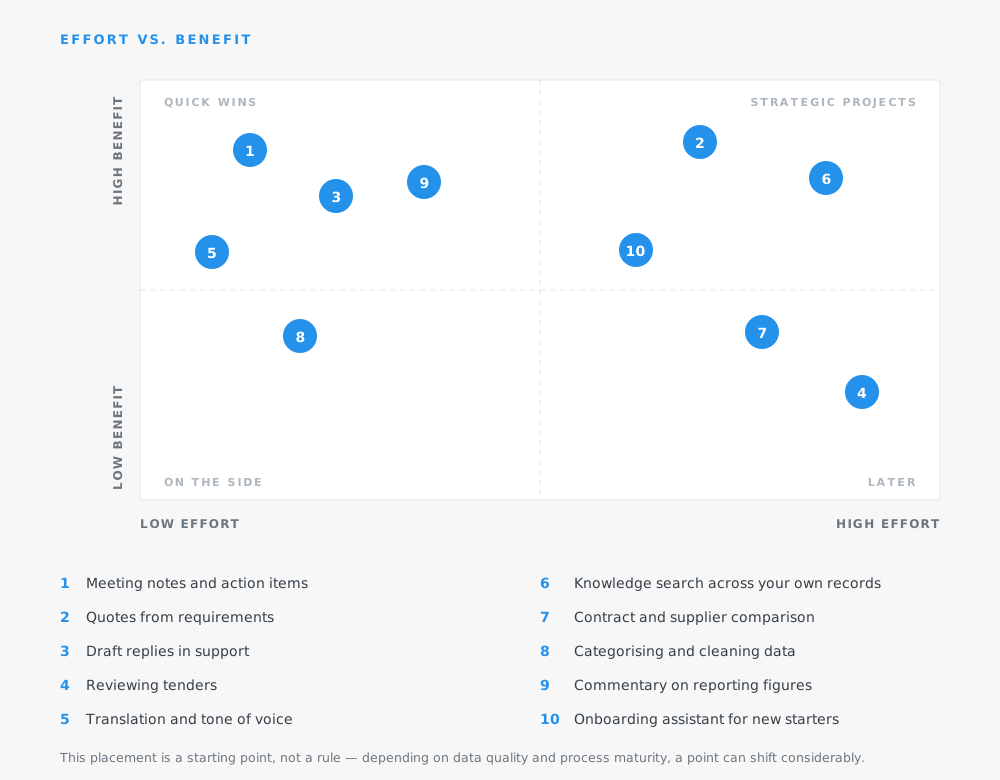
The three strategic projects
Higher effort, but a considerably bigger lever.
5. Quotes and cost estimates
A requirements list becomes a structured estimate with a range, cost blocks and open questions – in your template, with your costing logic.
This is more involved, because your knowledge of effort and risk margins has to be made explicit first. After that, the time needed per quote drops sharply – and, often more importantly, forgetfulness drops too: points you'd otherwise miss are reliably included.
6. Knowledge search across your own records
The AI searches connected drives and systems and answers questions with a source reference. “What did we quote this client two years ago?” in seconds instead of twenty minutes.
Where it runs into trouble: Data quality. If documents sit across five drives with three naming conventions, the result becomes unreliable. This use case rewards businesses with their filing under control – and penalises the rest.
7. Onboarding assistant
New starters ask questions about processes, tools and responsibilities and get answers from your own documentation. Noticeably takes load off team leads and shortens the first few weeks.
Where it runs into trouble: This assumes the documentation is current. An assistant explaining outdated processes does real harm.
Two use cases that get underestimated
8. Categorising and cleaning data
Classifying unstructured entries, spotting duplicates, turning free-text fields into usable categories. Not glamorous, but often the precondition for other use cases to work at all.
9. Contract and supplier comparison
Laying several documents side by side and pulling out differences in terms, deadlines and liability. The time saved is considerable, but the result still needs a professional review – point 3 of any sensible AI policy applies especially here.
One use case that can usually wait
10. Reviewing tenders
Searching large tender documents for requirements and exclusion criteria. The benefit is real, but the effort is high and the occasion irregular. For businesses that bid on tenders regularly, it's a strong case – for everyone else, not the right starting point.
How to choose the right use case
Three criteria, in this order
1. Frequency first
A task that comes up weekly beats one that comes up once a quarter – even if the rare one sounds more impressive.
2. Then the state of your data
Is everything you need already accessible, or would a connection have to be built first?
3. And finally, the review effort
A result that three people have to check over saves less than it promises.
What's deliberately missing from this list: use cases where AI acts externally without human oversight. That's technically possible, but the wrong choice to start with – the first visible mistake costs more trust than the first fifty successes build.
The honest part
Not every one of these ten cases will pay off for every business. Which ones do depends on your company size, your data situation, and where time is actually being lost. That's exactly what we clarify in the first phase, before anything gets built, and we regularly cross off ideas that looked good on paper but turn out to be no use at all.
.png)
.svg)