

In large organisations, automation with n8n rarely fails because of the technology. The platform is installed quickly, and a first workflow is built just as fast. What is usually missing is the governance around it: who may change what, how a workflow gets from development into production, and who is responsible when something fails. This article shows an approach that has proven itself in a large corporate environment, as a blueprint for your own n8n programme.
Why enterprise automation fails because of governance, not technology
n8n can be installed in a few hours, and a single workflow is often built in an afternoon. In a corporate environment, this low barrier becomes a problem as soon as several teams build workflows in parallel: without clear rules, automations emerge that are named differently, documented differently and secured differently, and that nobody except the person who built them understands. If this person is absent or leaves the company, the workflow becomes a black box. For critical processes, for example in HR or finance, this is a risk that no large company can take.
The solution is not to slow automation down, but to give it a reliable framework: clear environments, clear names, clear responsibilities and a defined path from idea to productive regular operation.
Separating DEV/TEST/PROD environments
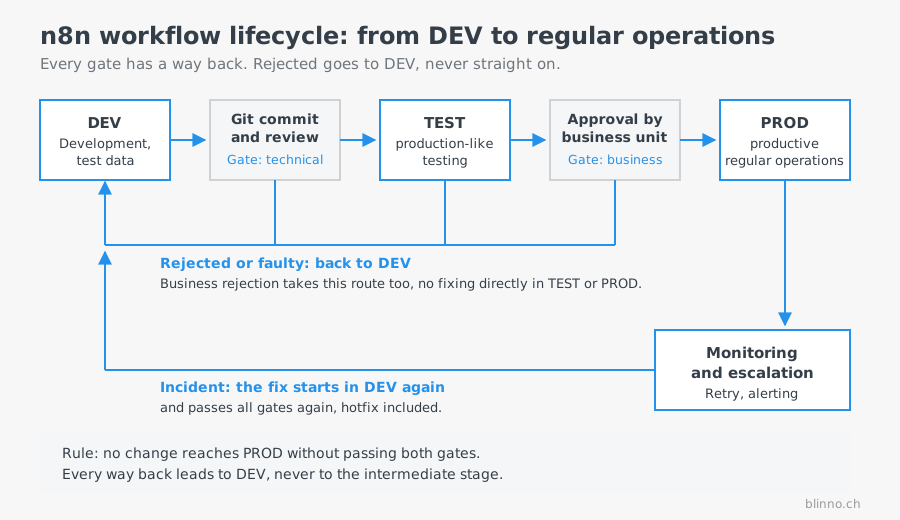
The first and most important building block is separating the n8n environments by maturity:
- DEV: Free development, experimenting with new nodes and logic, access to test or synthetic data instead of real production data.
- TEST: Workflows are checked with production-like but non-production data, including error cases and edge conditions.
- PROD: Only approved, documented workflows run here, with real data and a correspondingly narrow circle of access.
Each environment should be its own n8n instance, or at least a cleanly separated workspace with its own credentials. A common mistake is accidentally copying production credentials into a development environment just because it was quicker. Consistent separation prevents exactly that.
Git versioning of workflows
Workflows in n8n can be exported as JSON, which makes Git versioning possible. The advantage over “just saving in the n8n interface”: every change is traceable, a commit history shows who changed what and when, and a faulty change can be rolled back in a targeted way instead of reconstructing the whole workflow by hand. In practice, this means: changes from DEV are committed, brought to TEST through a pull request and review, and only merged into PROD after approval, instead of editing workflows directly in the production system.
Naming conventions: an example scheme
Without a naming convention, a growing workflow portfolio becomes confusing. A proven, simple scheme:
[Environment]-[Department]-[Process]-[Version]
Example: PROD-HR-Onboarding-Employee-v2
The same principle applies to:
- Credentials and access:
[System]-[Environment]-[Purpose], e.g.SAP-PROD-Readonly - Tags: consistent tags by department and criticality, e.g.
HR,critical,external-data-flow - Nodes within a workflow: descriptive names instead of the default label, e.g. “Read employee data from SAP” instead of “HTTP Request1”
Such a scheme takes some discipline at the start, but pays off clearly from the tenth workflow onwards, because every automation can be categorised at a glance without opening it.
Roles and approval processes
Governance also means clear roles. A split into at least three roles has proven itself: creator (builds the workflow in DEV), technical reviewer (checks code quality, error handling, security aspects) and business approver (checks from the department's point of view whether the process is mapped correctly before it goes to PROD). This separation ensures that a workflow does not go live on technical correctness alone but also on business correctness, and that the department supports the process instead of merely inheriting it.
Credential management and secrets
Access credentials never belong in the workflow itself, but in n8n's credential store, ideally complemented by a connection to an external secret manager for particularly sensitive access. Important principles: separate credentials per environment, minimal permissions (a workflow that only reads gets no write access), and no personal accounts of individual employees in favour of dedicated service accounts, so that access is not tied to a single person.
Structured error handling with escalation levels
A production-ready workflow needs defined error handling, not just the happy path. A proven model distinguishes several levels: automatic retry for transient errors such as short API outages, targeted handling of expected exceptions directly in the workflow, such as missing mandatory fields, and a central escalation mechanism for unexpected errors that informs the responsible person instead of silently swallowing the error. Without this tiering, errors either go unnoticed or cause alert fatigue because every little thing escalates immediately.
Masking data in logs
Execution logs are indispensable for debugging, but also a data protection risk if they contain personal data unchanged. Proven practice: mask or pseudonymise personal data in logs, keep retention periods for logs short, and leave business data in the source systems as far as possible instead of duplicating it permanently in the automation platform. This keeps the workflow debuggable without becoming a shadow copy of sensitive data sets.
Documentation and handover standard
A workflow without documentation is a risk for the day the person who built it is no longer available. A minimum standard covers: purpose and trigger of the workflow, systems and data flows involved, known error cases and how they are handled, and contacts for the business and IT side. This documentation does not belong in a separate wiki that nobody maintains, but attached directly to the workflow or in the same Git repository as the exported workflow.
Citizen developer guidelines
A big advantage of n8n is that technically skilled business users without classic developer training can also build workflows. To keep this from leading to uncontrolled sprawl, clear no-code/low-code guidelines are needed: which node types are approved for citizen developers, from what complexity or criticality a review by IT is mandatory, and which patterns (for example for error handling or credential use) are mandatory rather than freely selectable. This keeps the speed of no-code without diluting governance standards.
The three-phase approach as a blueprint
In an automation programme for a German car manufacturer with a very large, globally distributed workforce, a three-phase approach proved its worth that can be transferred to other corporate environments:
- Phase 1, laying the foundations: Before a single process is automated, release management and operating concept are in place. This covers DEV/PROD environment separation with Git versioning, naming conventions for workflows, modules, access and tags, and standardised no-code/low-code guidelines.
- Phase 2, agile implementation of prioritised processes: Specification and implementation run in parallel and iteratively for prioritised HR processes, with a structured approval process that includes both technical and business review before a workflow goes live.
- Phase 3, documentation and handover: The developed workflows are documented and moved into regular operations, including the error handling and escalation mechanisms, so that operations run without lasting dependence on the original development team.
The result of such an approach: traceable processes, low-risk releases thanks to clear approval stages, business sign-off without developer dependency, and data protection compliance that is thought through from the start instead of being bolted on afterwards.
Checklist: is your workflow production-ready?
- The workflow follows the naming convention for environment, department and process.
- The version is stored in Git, not only in the n8n editor.
- Technical review and business approval have been carried out and documented.
- Credentials are environment-specific and set up with minimal permissions.
- Error handling with retry logic and an escalation level is implemented.
- Personal data in logs is masked, retention periods are defined.
- Documentation on purpose, data flow and contacts is available.
- The party responsible for monitoring in regular operations is named.
✨ AI generated content
.svg)