

HR teams lose time every day to gaps between systems, paper forms and data that is entered by hand three times. If you want to automate HR processes, n8n is a tool that closes exactly these gaps without giving up control over sensitive personnel data. This article uses onboarding, payroll and offboarding to show what that looks like in practice.
Where HR time is really lost
Three patterns repeat in almost every HR department:
- System gaps: Data from applicant management has to be transferred manually into the payroll system because the systems are not connected.
- Paper: Signed contracts, exit forms or references are scanned, filed and have to be processed further by hand.
- Duplicate entry: The same information, such as a change of address or new bank details, is maintained separately in several systems.
Each of these costs not only time but also adds to the risk of errors. A wrongly transferred IBAN or a forgotten access removal has direct consequences, financially or for security.
The three core processes as workflows
The following three flows are general examples. They show how such workflows can be built and what matters when doing so. In practice, scope, order and system landscape differ considerably from company to company.
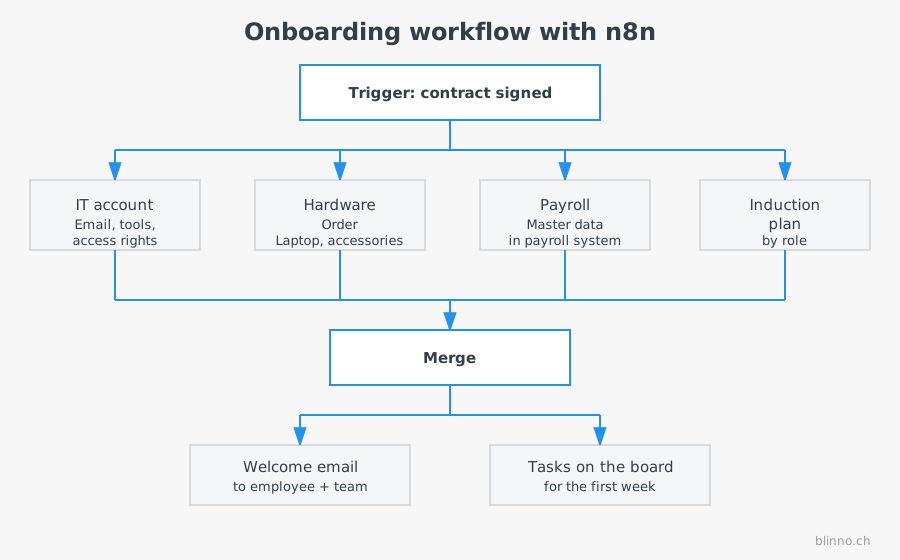
Onboarding
Trigger: The contract is signed (e.g. a status change in the HR system or a completed digital signature).
- Accounts for IT systems (email, internal tools) are created automatically.
- The hardware order is triggered (laptop, accessories depending on the role).
- An individual induction plan is put together by department and role.
- Access rights are assigned according to the role, not across the board.
- A welcome email with all relevant information goes automatically to the new employee and their manager.
The advantage: the four steps before the welcome email can run in parallel instead of one after the other. This noticeably shortens the lead time until the first day of work.
Payroll
Trigger: End of the recording period or a daily time tracking sync.
- Time tracking data is retrieved from the time tracking system.
- An automated check detects outliers (e.g. missing entries, implausible hours).
- Checked data is transferred to the payroll system.
- An error report with all conspicuous cases goes to the responsible person for manual review before the payroll runs are finally approved.
The automated check does not replace the professional approval. It reduces the number of cases that have to be looked at manually in the first place.
Offboarding
Trigger: The leaving date is reached or the termination process is completed.
- Access to all systems is withdrawn automatically at the defined time.
- The return of hardware is initiated and tracked.
- The employment reference is prepared from stored text modules.
- Personnel records are archived according to retention periods.
Access removal in particular is critical for security: an automated, time-controlled workflow prevents former employees from accidentally keeping access for days or weeks longer.
All three processes share a common pattern: a clearly defined trigger, several parallel or sequential steps and a point where results are merged and documented. This pattern can also be applied to other HR processes, such as internal transfers, return from parental leave or contract extensions, once the three core processes run stably.
Data protection for personnel data
HR automation processes particularly sensitive data. Three points belong in the architecture from the start, not as a later addition:
- Masking: Logs and error messages must not show plain data such as social security numbers or salary details.
- Access protection: Only authorised systems and people get access to the relevant data fields, following the principle of least privilege.
- Deletion periods: Retention periods have to be stored in the workflow so that data is not kept longer than legally permitted.
Traceability is also needed: every automated action on personnel data should be logged, so that in the event of an audit or an error it is clear what happened and when.
Experience from a large corporate environment
Blinno has introduced n8n at a corporate group with over 150,000 employees. What carries over is mainly the approach. The programme was delivered in three phases: first governance and lifecycle foundations with a release concept, separate DEV and PROD environments, Git versioning and naming conventions. Then came the agile implementation of the prioritised processes, and finally documentation and handover to ongoing operations. Throughout, structured error handling with multi-level escalation and consistent data masking in all automation logs applied.
The principles that also apply in an organisation of 50 employees do not have to be reinvented in a large corporate group. They only have to be applied consistently and documented properly.
A realistic rollout order
Not tackling all three processes at once is usually the wiser way. A proven order:
- Assessment: Document existing processes, identify system gaps and sources of error.
- Onboarding first: Usually the process with the clearest trigger and the lowest compliance risk, well suited as a first productive use case.
- Offboarding next: Relevant for security, but structurally similar to onboarding and therefore possible with little extra effort.
- Payroll last: The most critical in terms of consequences of errors. Automate it only once the team and the process have built up trust in the automation.
Compliance and traceability as an ongoing task
Automated HR processes have to stay compliant permanently, not just at rollout. Changes in law, for example on retention periods or reporting obligations, have a direct effect on existing workflows. That is why a periodic review of the automation logic is part of operations. Clean versioning is just as important: if you change a payroll workflow, you should be able to trace which version was live when and who approved the change. It is exactly this governance discipline, with separate test and production environments and documented approvals, that makes the difference between a working pilot project and permanently stable operation.
✨ AI generated content
.svg)