

Many companies start with Zapier because it is easy to use. As soon as the number of automations grows or more complex logic is needed, the search for a Zapier alternative quickly becomes concrete. Make offers more control, often lower costs and the option to process data on EU servers. This guide shows how to run a migration in a structured way.
Why companies switch from Zapier to Make
Costs: tasks vs. credits
Zapier counts every single action in a Zap as a task and prices its plans accordingly. Make counts credits instead, where a standard module usually consumes one credit, regardless of how many data fields are processed. Until August 2026, this unit was still called an operation. For scenarios with many data points per execution (for example processing a whole record with several fields), this can be cheaper in Make, as each field is not counted individually. A direct price comparison always makes sense based on your own automation volume, as both providers run different plan tiers with different limits. Check the current prices on the official pages of Make and Zapier, as of September 2026.
Multi-step logic
Zapier handles branching through Paths, while Make offers a router with any number of branches and filters per branch. Make also includes an iterator for arrays and aggregators for merging several bundles, which in Zapier often requires additional Zaps or Formatter steps.
Data protection and EU servers
Make runs infrastructure with server locations in the EU, which matters for companies with strict data protection requirements. Zapier is primarily hosted in the US. For Swiss and European companies, this can be a deciding factor when choosing a platform, regardless of features or price.
Concept translation: Zapier to Make
The following table helps you translate existing Zaps into Make scenarios in your head.
This translation is a guide, not an exact 1:1 mapping. Some Zaps can even be built with fewer steps in Make, as the router and iterator combine more logic in a single module.
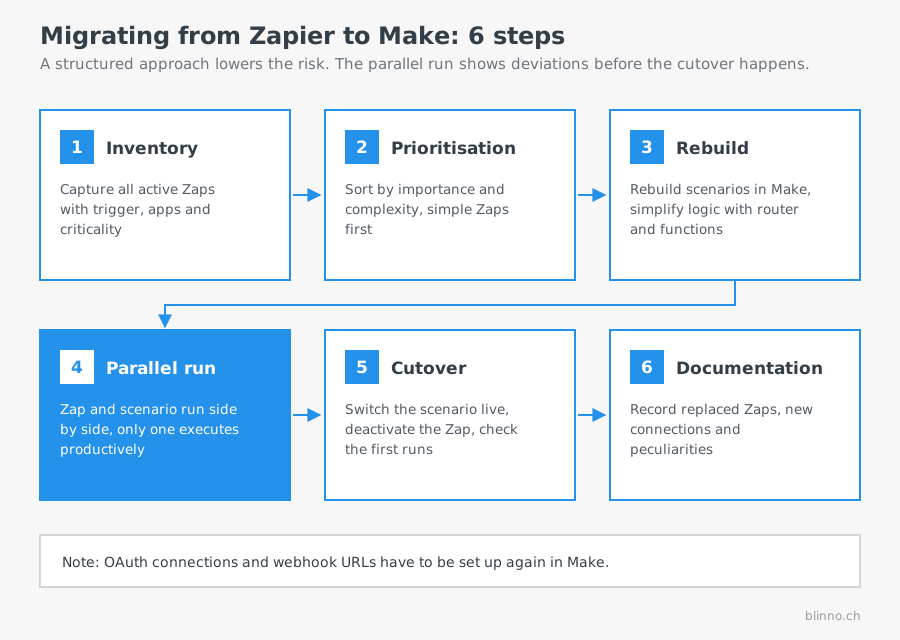
Migration plan in 6 steps
Step 1: Create an inventory
List all active Zaps, including trigger, apps used, execution frequency and business criticality. This overview is the basis for all further decisions and often also reveals unused or duplicate Zaps that do not need to be migrated at all.
Step 2: Prioritisation
Not all Zaps have to be migrated at the same time. Sort by business importance and complexity. Simple, non-critical Zaps make good first test cases to gain experience with Make before you touch critical processes.
Step 3: Rebuild in Make
Rebuild each scenario in Make instead of trying to import a Zap configuration directly. Use the opportunity to simplify logic, for example with a router instead of several parallel Zaps, or with built-in functions instead of external Formatter services. For simpler Zaps, this step can be sped up with AI: an AI captures the Zap logic in a structured way and generates a Make blueprint from it, which you import through the Make API. More on this in the section “Can the migration be automated with AI?” below.
Step 4: Parallel run
Let the existing Zap and the new Make scenario run in parallel for a defined period, with only one of the two actually performing productive actions (for example disabled via a filter) and the other only logging for test purposes. This lets you compare results without risking duplicate records or duplicate notifications.
Step 5: Cutover
Once the Make scenario reliably delivers the expected results, you switch it to production and deactivate the corresponding Zap. Check the first executions closely right after the switch, before you move on to the next Zap.
Step 6: Documentation
Record which scenario replaces which Zap, which connections were set up again and which peculiarities came up during the rebuild. This documentation makes later maintenance much easier and is indispensable when the person responsible changes.
Can the migration be automated with AI?
A question that comes up regularly in migration projects: can the migration be automated through MCP (Model Context Protocol), so that an AI moves the scenarios directly from Zapier to Make? The short answer after checking Zapier MCP, Make MCP and the Make API: as of September 2026, there is no ready-made one-click tool for this. Both MCP offerings solve a different problem than you might assume at first glance.
Zapier MCP (zapier.com/mcp, docs.zapier.com/mcp) connects an AI assistant with more than 9,000 apps and several tens of thousands of actions. It executes actions, for example sending a message in Slack, adding a row in Google Sheets or updating a record in a CRM. It does not read or export existing Zap definitions, however. An early add-on called “Next Gen Zap workflows” lets an AI build new Zaps from a description, but that does not help with a migration to Make, because the result is again a Zap.
Make MCP comes in two variants that are often confused. The Make MCP Server makes your Make scenarios callable for an AI: it can run scenarios and, on paid plans, view and change scenarios as well as related connections, webhooks and data stores. The Make MCP Client works the other way round: it allows a Make scenario to use tools on external MCP servers, such as GitHub or PayPal. Neither variant is documented as a migration tool or reads Zapier configurations.
What does work is an indirect route through the Make API v2. The API lets you create a new scenario directly from a blueprint JSON (POST /scenarios with blueprint, team ID and scheduling as parameters), instead of clicking together every module in the interface. A realistic AI-assisted workflow therefore looks like this:
- Capture the Zap logic in a structured way: On Team or Enterprise plans, Zapier offers a JSON export of existing Zap workflows (under account settings, not via MCP). This format is not documented as an open interface for third parties, but it can serve as a starting point for showing an AI the trigger, steps and field mappings of a Zap. On Free and Professional plans, only a manual description of each step remains.
- AI generates a Make blueprint: From the structured description, an AI generates a blueprint JSON following the Make schema (flow array with modules, mapping expressions, routers for branches).
- Import through the Make API: The generated blueprint is created as a new scenario with an API call, instead of being built by hand.
- Manual follow-up work: Connections, webhook URLs and tests remain manual work, more on that below.
How much time this saves depends heavily on complexity. For simple to medium Zaps with a few standard apps, this approach can reduce the pure rebuild effort (step 3 of the migration plan) by roughly 30 to 50 per cent, because clicking the modules together is no longer needed. Across the whole migration, including connections, tests and cutover, the realistic saving is much smaller, more in the range of 15 to 25 per cent of the total time. These values are a cautious estimate, not a reliable customer figure, and should be checked per project.
Where this approach breaks down
- Custom code steps: Code by Zapier blocks in JavaScript or Python have to be understood and translated into Make logic or a custom module. An AI can suggest this, but the result has to be checked.
- Zapier's own Formatter logic: Not every Formatter function has a direct equivalent in Make. Mistranslations often only show up when running with real data.
- Paths with complex conditions: Translating nested branching logic into a router with several filters is error-prone if an AI adopts it unchecked.
- OAuth connections are always manual: Neither the Make API nor an MCP server can create a new OAuth authorisation without a person interacting in the browser. This stays manual work in every scenario.
- Tests with real data: Whether a generated scenario works correctly only becomes clear in the parallel run with real records, see step 4. This cannot be automated, only prepared faster.
- Rate limits on blueprint import: Depending on the plan, the Make API limits requests to between 60 and 1,000 per minute. This is no issue for individual scenarios, but in a mass migration of several dozen Zaps at once, it can limit the speed of the automated import.
For companies with a larger number of similarly built Zaps, this AI-assisted route can noticeably reduce the effort. With few or very different Zaps, the effort of capturing the logic cleanly often outweighs the time saved on the actual build.
Typical pitfalls during migration
- Webhook URLs change: Every webhook address in Make differs from the one used in Zapier. All systems that actively send data to the old Zapier webhook URL (for example a web form or an external app) have to be switched to the new Make address.
- OAuth connections have to be authorised again: Existing connections to Google, Microsoft, CRM systems and other apps cannot be carried over from Zapier. Every connection has to be authorised again in Make through the respective login flow.
- Time zones: Scheduled Zaps and Make scenarios can use different default time zones. Explicitly check the time zone set for each scheduled scenario to avoid shifts in execution times.
- Formulas and data processing: Formatter steps from Zapier can usually, but not always, be translated 1:1 into Make functions. Test more complex formulas (such as nested conditions) individually instead of adopting them blindly.
Cost comparison: a worked example
Assume a company runs around 8,000 individual action steps per month across several Zaps, with each run averaging four action steps (that is roughly 2,000 executions). In Zapier, each of the 8,000 action steps counts as its own task, which requires a correspondingly higher plan. In Make, a comparable scenario with the same four steps usually consumes four credits per execution, so also roughly 8,000 credits for 2,000 executions, provided each step corresponds to its own module. The difference mainly shows where a single Make module processes several data points at once (for example an iterator followed by an aggregation), while Zapier would count several tasks separately for the same thing. For a reliable estimate, work out your own automation volume against the current plan tables of both providers, as tiers and limits can change.
✨ AI generated content

.png)
.svg)