

Most AI conversations in business fail at a mundane point: the model doesn't know your data. It doesn't know what's in your CRM, which quote went out last week, or how a project is progressing. So someone copies the information by hand into the chat – and that's where the real problem starts.
Model Context Protocol, MCP for short, is the answer to that. It's an open standard that connects AI applications to external systems: data sources, tools, workflows. Anthropic introduced it, and it's now widely supported – monday.com, among others, provides an official MCP server.
For decision-makers, the technical detail matters less than one property: MCP turns an uncontrolled copy-paste process into controlled, loggable access.
What is MCP?
Picture MCP as reception in an office building. Without reception, anyone who can get the door open walks in, and afterwards nobody knows who was where. With reception, every visitor signs in, gets a pass, is allowed onto certain floors and not others – and the logbook shows who was there and when.
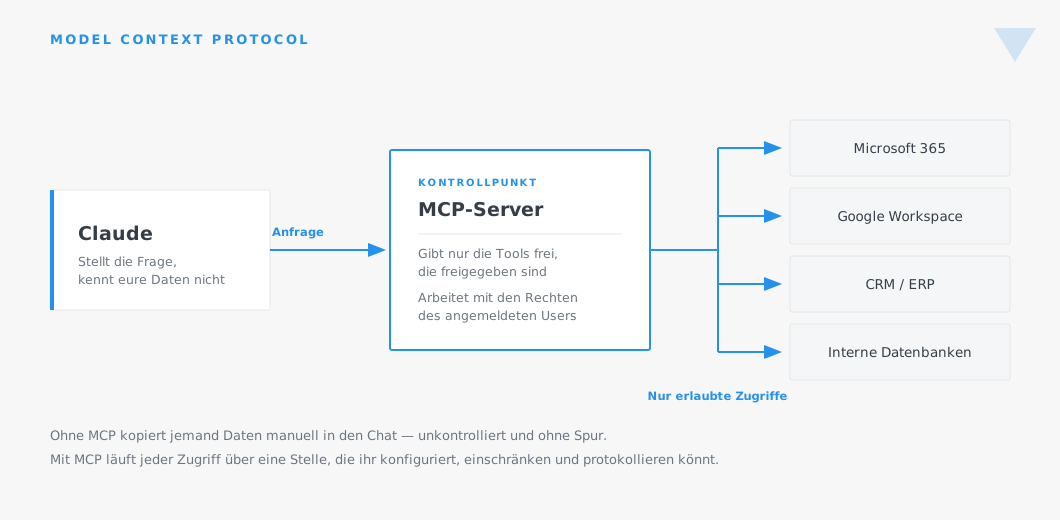
An MCP server is that reception desk. It sits between the AI and your systems. It decides which functions are even offered, and it works with the permissions of the signed-in person – not with full access.
This is the point worth not overlooking when weighing it up: MCP doesn't simply extend the AI's access. It makes access controllable for the first time.
What an MCP server actually does
Technically, an MCP server provides a list of tools the AI can call. Practical examples: “search contacts”, “read the items on a board”, “create a document”, “query this database”.
When Claude works on a task, it decides which of these tools it needs, calls it, and carries on with the result. Whatever isn't on the list doesn't exist for the AI. That sounds trivial, but it's the central security mechanism: you define the list.
An example of the difference in everyday use. Without MCP: an employee exports a customer list as Excel, uploads it to a chat, and has it analysed. The file now sits outside your systems, nobody knows about it, and it's out of date by the next day. With MCP: the AI queries the list via the server, sees exactly the records that employee is allowed to see anyway, and works with the current state. The access is in the log.
Three ways to use MCP
Ready-made servers from vendors
Many providers now offer their own MCP servers. monday.com, for example, runs an official server with over sixty tools – from boards and items to documents and direct database queries. Servers like this are the fastest way in, because nothing needs to be built.
Your own servers for internal systems
For an in-house application, an industry solution with no standard integration, or an internal database, you build your own MCP server. That's manageable effort – most of the work usually isn't in the server itself, but in deciding which tools it should offer, and which it deliberately shouldn't.
Connectors as an off-the-shelf package
Many common services already have ready-made connections that technically run on MCP but need no configuration. If you want to start quickly, this is where to begin.
Where MCP can break
In the interest of honesty, three points that come up regularly in projects.
Too many tools
A server that offers everything the API allows doesn't make the AI smarter, just slower and less predictable. Fewer, precisely described tools deliver better results than fifty generic ones.
API limits
Every call counts against the connected system's quota. For an agentic task that makes thirty queries, that adds up. This needs to be worked out before going live, not after.
Permissions that were never cleaned up
MCP works with the signed-in user's permissions. If your CRM has grown historically to the point where everyone can see everything, the AI sees everything too. MCP doesn't make existing permission problems worse – but it does make them visible. This is often the moment a permissions concept finally gets overhauled.
What you get out of it
The benefit sits on two levels.
Practically: answers come from the current data rather than an export from last week, and nobody spends time hunting things down. Governance: every access runs through a single point you configure, restrict and log.
That's exactly why we treat the integration not as a technical detail at the end, but as part of the governance concept – in Design, before anything gets built.

.svg)