

Do you know these challenges?
- Projects run in parallel, but no one sees the overall status.
- Different teams work with different standards.
- Project reporting is manual and prone to errors.
- Blockers are detected too late.
- Effort and progress don't go together.
However, many companies use monday.com without a clear project logic and project management structure.


The solution: PROJECTone
Many companies face the same problem: they use monday.com, but effectively managing multiple projects remains a challenge, especially without an expensive Enterprise plan. With PROJECTone, which works with the monday.com Pro version and above, you can get started straight away and manage your projects in a structured and transparent way – not just in Work Management, but also in monday CRM and monday Service!
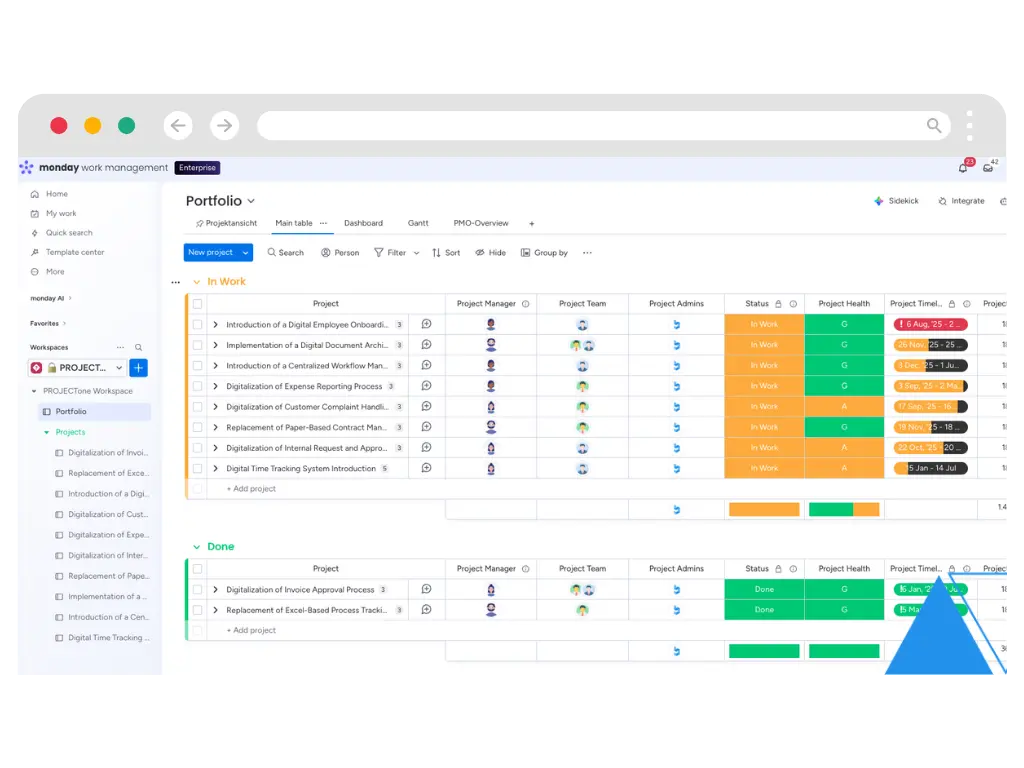
Real-time project status
A central overview of all projects, including automatic status updates, health indicators and progress metrics.
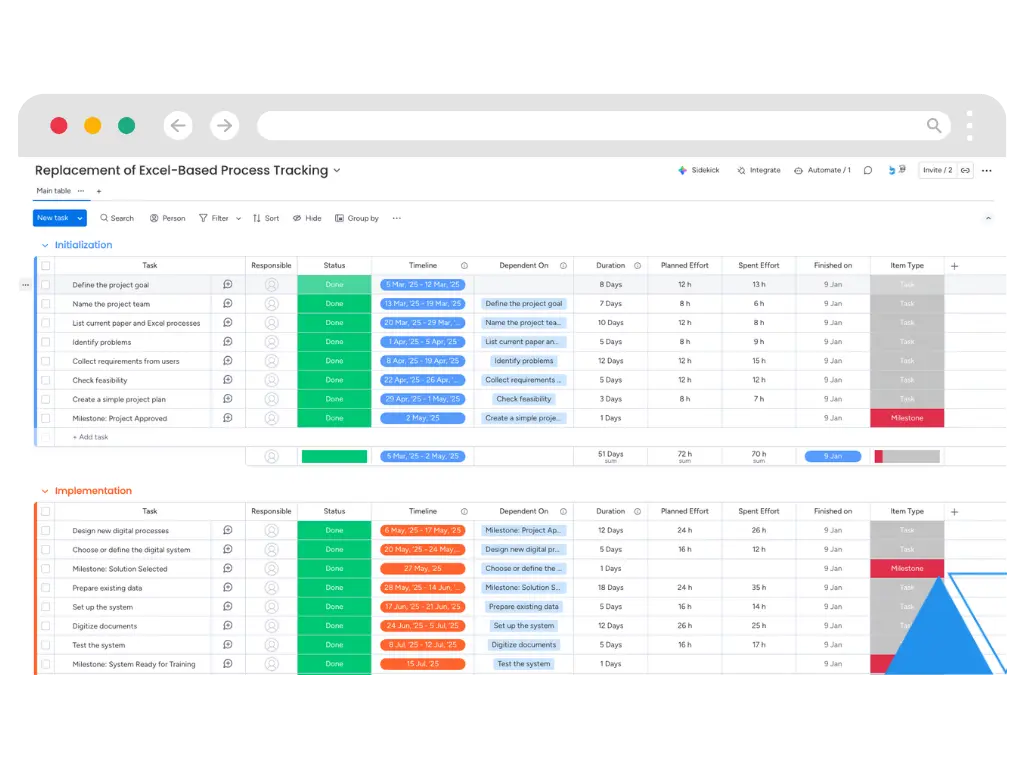
Operational Project Board
A clear task structure with responsibilities, dependencies, timelines and effort fields.
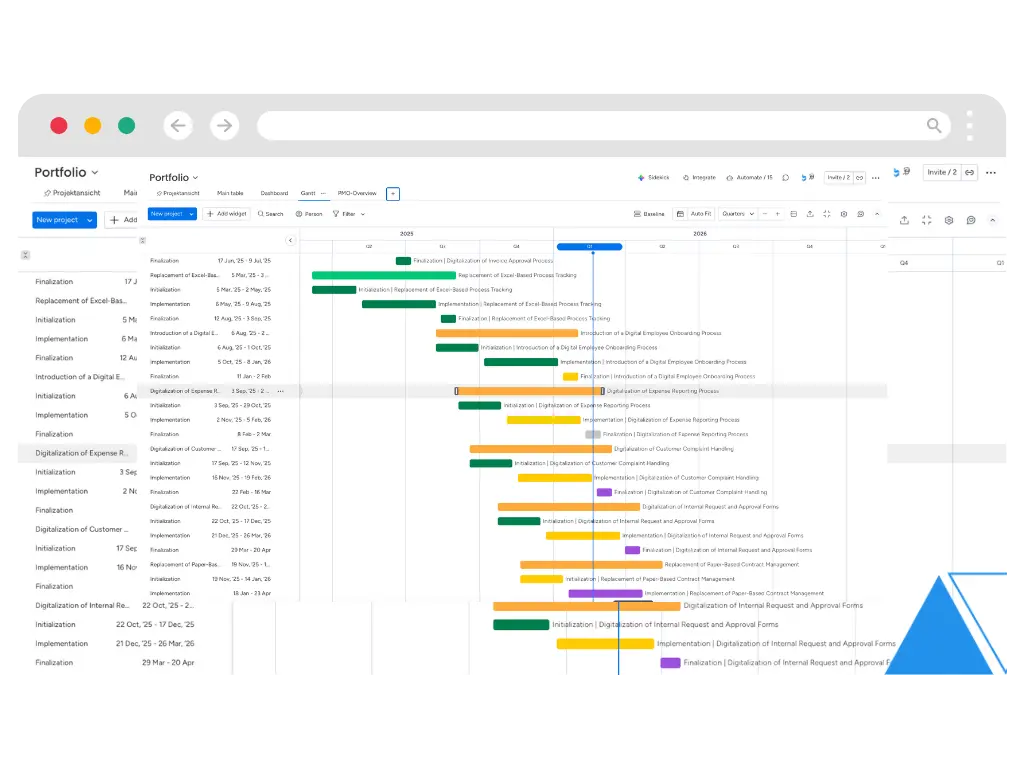
Synchronised structure
Project phases are synchronised automatically between the board and the overview, without the need for manual double-entry.
A vision of progress with substance
Progress is calculated based on tasks and actual time spent, ensuring realistic project transparency.
Milestone-driven project logic
Milestones mark the completion of phases and automatically update the overall status.
Reporting & Monitoring
Central view showing status, budget, blockers, timeline and key project metrics.

Who is PROJECTone suitable for?
PROJECTone is ideal for companies with multiple concurrent projects that require consistent project management within monday Workmanagement, CRM or Service.
Suitable for:
- Project managers who need a clear project structurewho need a clear project structure
- PMO / Operations for the standardisation of project management and reportingfor the standardisation of project management and reporting
- C-level executives for transparency regarding project status, budget and risksfor transparency regarding project status, budget and risks
- IT/tool owners who wish to professionalise their project managementwho wish to professionalise their project management
Suitable for use in sectors such as:
Agencies, consultancies, IT & software firms, industry, construction & engineering, as well as SMEs and large enterprises in Switzerland and the DACH region with a growing portfolio of projects.
This is how we lead PEOJECTone with you
PROJECTone is ready to use straight away – customisations can be added later via additional hourly packages. Price on request.
1. Basic installation
We will install PROJECTone in your monday.com environment and set up the entire basic structure. Status logic, project boards and standard views are pre-configured and ready to use straight away.
2. Technical set-up & go-live
We’ll handle the technical configuration and ensure that the solution is seamlessly integrated into your existing monday.com environment. We’ll then support you through the go-live process to ensure a smooth start.
3. Customised extensions as required
If you wish to adapt PROJECTone to your specific processes, reporting requirements or organisational structures, this can be done through a follow-up project contract with improved terms.
Why PROJECTone from Blinno?
Already works with the monday.com Pro version
No Enterprise plan required – PROJECTone works directly with your existing monday.com Pro licences.
Ready to use in all monday.com products
The solution is pre-configured and can be used in monday Workmanagement, CRM and Service immediately after installation.
Standardised & scalable
A consistent project structure across teams, projects and responsibilities.
Customisation is possible
Process- or company-specific extensions can be booked via hourly packages.
The solution you need!
Say goodbye to Excel spreadsheets, status confusion and unclear project statuses. With PROJECTone, you get a structured, scalable and ready-to-use project management solution right within monday.com.




FAQ
Do you have any questions about PROJECTone? Here are the answers to some of the questions you might have:
Do we need a specific monday.com licence?
PROJECTone is built entirely on monday.com and is designed so that the solution can be fully implemented and used with the Pro version. However, the solution can also be used with the Enterprise version. We’d be happy to look at this together during a demo call.
How long will the implementation take?
The basic setup will be implemented within a week. After that, it will depend on your business requirements and processes, which we will discuss and analyse together. We generally expect the process to take between three and six weeks to install the solution, including customisation to suit your business processes. The customisation of the solution is offered at preferential rates. Please feel free to contact us for a quote.
Is the solution customisable?
PROJECTone has a modular design and can be tailored to your industry, your project workflow and your organisational structure. Phases, status logic, effort tracking, reporting and additional fields can be added as required without disrupting the system’s underlying logic. The end result is a solution that is fully tailored to your project management needs.
What makes ProjectOne different from a normal Monday template?
A simple template only represents a project.
ProjectOne connects:
- standard project management.
- Project status aggregation.
- effort-based progress logic.
- Milestone-controlled phase closures.
- Synchronized structure between portfolio and project board.
- Ready to use in monday.com Pro version - no enterprise subscription is required.
It is not a template, it is a sophisticated system architecture for professional project management.
Can the PROJECTone solution be extended?
Yes PROJECTone can be extended with:
- resource planning
- Time recording (e.g. MOCO integration)
- Automations via Make
- AI-powered status summary
The solution grows with your requirements.